
What a Warehouse Management System Actually Does (Beyond the Sales Pitch)
Real WMS software differs from basic inventory tracking by $250,000 annually in most warehouses.
A true warehouse management system tracks 10,000+ SKUs across 50+ locations in real-time. But that's just table stakes. The real power comes from orchestrating complex fulfillment workflows. When an order drops, your WMS instantly calculates the optimal pick path across eight distinct steps: order receipt, inventory allocation, pick list generation, location routing, picking confirmation, packing optimization, shipping selection, and carrier handoff.
Basic inventory tracking tells you that you have 100 units of SKU-12345. A warehouse management system tells you that 40 units sit in location A-12-3, 30 in B-4-7, and 30 in overflow storage C-9-2. It knows the first location requires a forklift, the second is at eye level for easy picking, and the third hasn't been cycle-counted in 45 days. When five orders for that SKU hit simultaneously, the WMS routes pickers to grab 3 from A-12-3 and 2 from B-4-7 based on their current warehouse positions.
The $250,000 Difference Between Inventory Software and True WMS
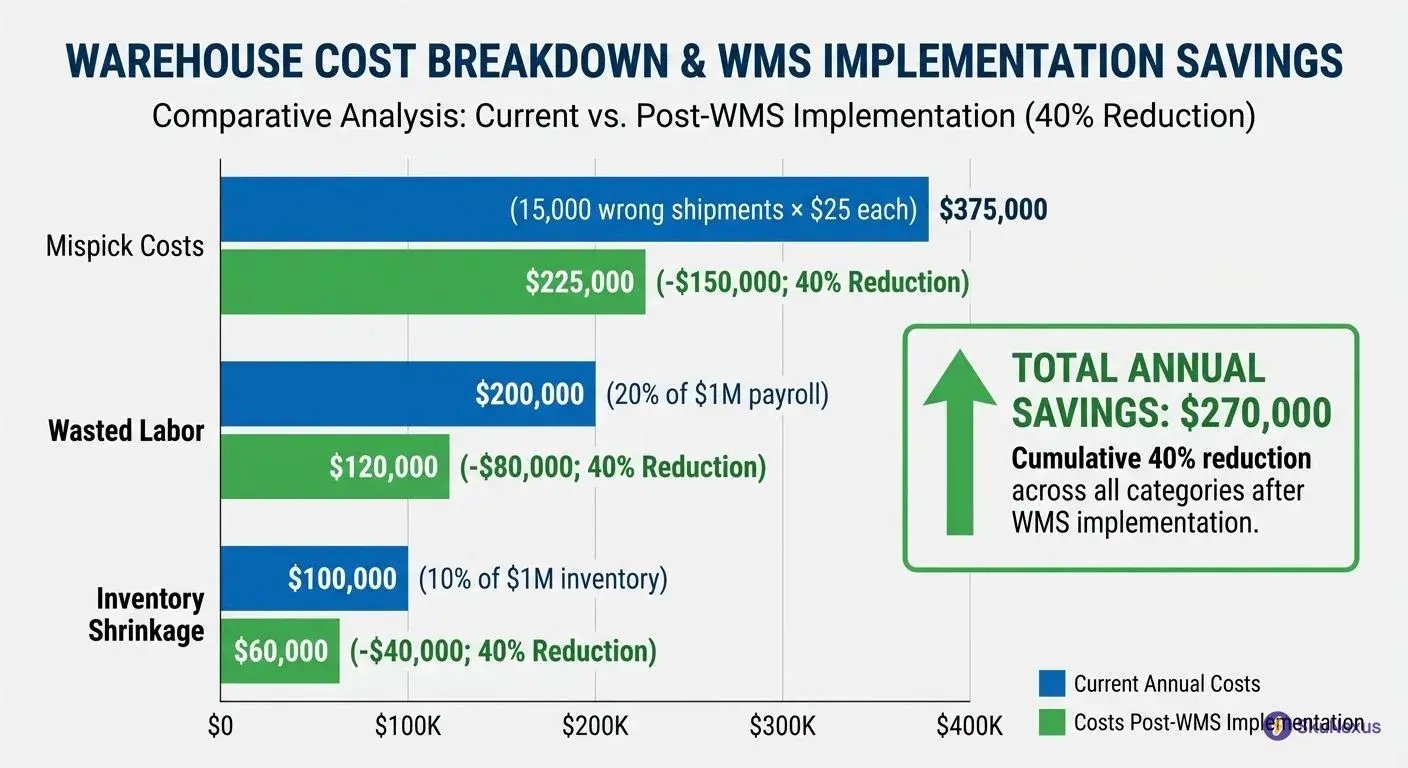
A typical operation processing 100,000 orders annually faces a 15% mispick rate, 20% excess labor from inefficient routing, and 10% inventory shrinkage without proper WMS software.
Each mispick costs you $25 in return shipping, reprocessing, and customer service time. That's $375,000 on 15,000 wrong shipments. Add 20% wasted labor on a $1M annual warehouse payroll for another $200,000. Toss in 10% shrinkage on $1M inventory value for $100,000 more. Even if a proper warehouse management system only prevents 40% of these issues, you're saving $270,000 annually.
5 Warning Signs You're Hemorrhaging Money Without a WMS
Your warehouse team walks 15 miles daily, spends three hours counting inventory, and still can't find 10% of your stock. These aren't operational hiccups—they're symptoms of missing WMS software that signal massive financial bleeding.
1. Your Pickers Walk 15+ Miles Daily
Track your best picker tomorrow. They'll log 60,000+ steps traversing your warehouse without optimized pick paths. Watch them zigzag between zones, backtrack for forgotten items, and waste entire afternoons on unnecessary travel. This excessive movement indicates your warehouse layout lacks intelligent routing algorithms that guide workers along efficient paths.
2. You Burn 3+ Hours Daily on Manual Cycle Counts
Your inventory manager prints spreadsheets, assigns counters to zones, and spends mornings reconciling paper counts. Three hours minimum. Every day. Teams huddle around clipboards, debate discrepancies, and restart counts when numbers don't match. This time-consuming ritual signals your operation lacks perpetual inventory tracking that updates stock levels automatically.
3. Your Order Error Rate Exceeds 5%
Five wrong orders per hundred reveals a pattern: pickers squint at handwritten notes, grab similar-looking products, and skip verification steps under time pressure. Customer service fields angry calls about wrong colors, incorrect quantities, and missing items. This error frequency indicates your fulfillment process lacks barcode scanning and weight verification safeguards.
4. You Can't Locate 10% of Your Inventory
When staff shrug and say "it's somewhere in the warehouse," you're looking at phantom inventory. Products disappear into unlabeled zones, get buried behind other items, or sit in temporary locations that become permanent. This mystery stock forces unnecessary reorders while actual inventory collects dust. The symptom reveals your operation lacks systematic location tracking.
5. Two People Manage Excel-Based Inventory
Sarah manages receiving spreadsheets while Tom tracks picking sheets. They spend hours daily reconciling differences, arguing over whose numbers are correct, and creating duplicate entries. This redundant data management indicates your warehouse lacks real-time inventory updates that eliminate manual reconciliation.
These five symptoms signal systematic inefficiencies that WMS software directly addresses.
The 6 Types of WMS Software (And Which 3 Are Actually Worth Your Time)
Six types of warehouse management systems exist in the market, but only three handle 95% of real-world use cases: standalone WMS, cloud-based platforms, and ERP-integrated modules. The other three—on-premise legacy systems, supply chain suites, and industry-specific solutions—serve niche scenarios that probably don't apply to you.
Here's how the landscape breaks down. Standalone WMS software delivers Ferrari performance for high-volume operations. Cloud platforms get you running in 90 days at a fraction of the cost. ERP modules integrate naturally if you're already invested in SAP or Oracle. The rest? On-premise systems are dying dinosaurs, supply chain suites overcomplicate simple needs, and industry-specific tools lock you into rigid workflows.
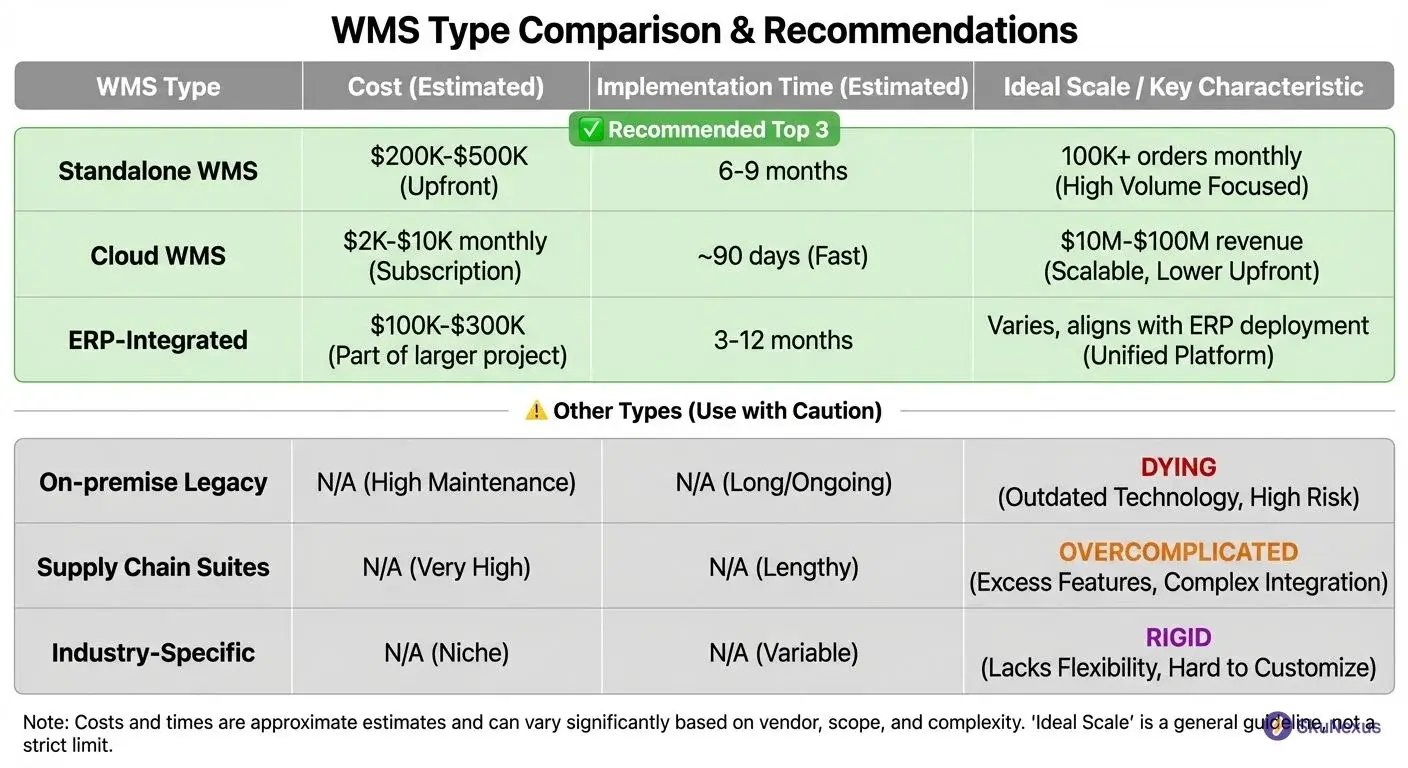
, implementation time (3-12 months), and ideal company size)
Standalone WMS: When You Need Ferrari Performance
Processing 100,000+ orders monthly? You need the horsepower of standalone WMS software. Manhattan Associates and Blue Yonder dominate this space, commanding $200,000 to $500,000 in year-one costs. That price tag buys you the ability to orchestrate 500 concurrent users, manage multi-site operations, and handle complex kitting workflows that would break lesser systems.
Implementation takes 6-9 months—and that's with experienced consultants. Manhattan's WMS processes 2 million transactions daily at major retailers. Blue Yonder handles Amazon-level complexity. But here's what vendors won't mention: 70% of that functionality sits unused in most warehouses. You're paying Formula 1 prices for features you'll never touch.
Modern alternatives like SkuNexus deliver the same enterprise-grade performance at half the cost, implemented in 90 days instead of 9 months. Think of it this way. Legacy platforms built their systems when warehouses moved slowly. Today's operations need agility, not bloat. In SkuNexus, configuring a new fulfillment workflow takes hours, not weeks of consultant time.
Cloud WMS: The 90-Day Implementation Sweet Spot
Most growing businesses find their sweet spot with cloud-based warehouse management systems. Platforms like SkuNexus combine rapid deployment with enterprise features—API-first architecture, real-time analytics, and unlimited customization without code changes. Companies doing $10M to $100M in revenue pay monthly subscriptions of $2,000 to $10,000—replacing massive capital expenditures with predictable operating costs. More importantly, you're live in 90 days, not 9 months.
Cloud platforms slash total cost of ownership by 40% versus on-premise systems. No servers to maintain, automatic updates, and instant scalability during peak seasons. ShipBob excels for direct-to-consumer brands needing multi-location fulfillment. Extensiv (formerly 3PL Central) dominates the third-party logistics space. Deposco targets mid-market retailers with complex distribution needs.
The real advantage? Speed to value. While standalone implementations crawl through requirements gathering, cloud WMS gets you picking more efficiently next quarter. In SkuNexus, this looks like going from contract signing to processing orders in 12 weeks—including data migration and staff training. You're operational before traditional vendors finish their discovery phase.
ERP-Integrated WMS: One Throat to Choke
Already running SAP, Oracle, or Microsoft Dynamics? Adding their WMS module makes financial sense—sometimes. Budget $100,000 to $300,000 on top of your ERP investment. SAP Extended Warehouse Management (EWM) integrates perfectly with S/4HANA. Oracle WMS Cloud syncs natively with NetSuite. Microsoft Dynamics 365 Supply Chain Management keeps everything under one roof.
The appeal is obvious. One vendor relationship, unified data model, no integration nightmares. When orders flow from your ERP to warehouse to shipping without middleware, life gets simpler. Your IT team manages one system instead of three. Support calls go to one number.
But here's the trade-off. ERP-integrated modules deliver about 70% of standalone WMS functionality. They excel at basic receiving, picking, and shipping. They struggle with advanced slotting, complex wave planning, or sophisticated labor management. Think of it as buying the sedan version when standalone WMS offers the sports car. For many operations, that sedan handles the daily commute just fine.
Now that we've covered which type of WMS actually solves your specific problems, you need to understand exactly where WMS fits in your tech stack—because 40% of implementations fail due to scope confusion. Let's clarify the boundaries between WMS, inventory management, and ERP systems before you start vendor demos.
WMS vs IMS vs ERP: The $500K Integration Mistake to Avoid
System boundaries trip up 40% of implementations because companies don't define who owns what data. Your WMS tracks eight critical data points: what product, where it sits, when it moved, who touched it, which order needs it, how to pick it, where to ship it, and which carrier to use. Your inventory management system (IMS) tracks just two: what you have and how much. Your ERP only cares about the money trail.
Mix these responsibilities and you'll burn $500,000 on redundant systems, failed integrations, and consultant fees to untangle the mess. A $50M distributor bought Manhattan WMS to "improve inventory accuracy." Six months and $400,000 later, they discovered they needed basic cycle counting—a $50,000 IMS feature. Their expensive WMS became a glorified barcode scanner because nobody defined clear system boundaries upfront.
Think of it this way. Your ERP is the CFO tracking financial impact. Your IMS is the inventory analyst counting widgets. Your WMS is the warehouse manager orchestrating actual operations. When an order drops, your ERP records the revenue, your IMS decrements inventory levels, and your WMS figures out the optimal pick path across 47 warehouse locations. Each system owns specific data and passes only what others need.
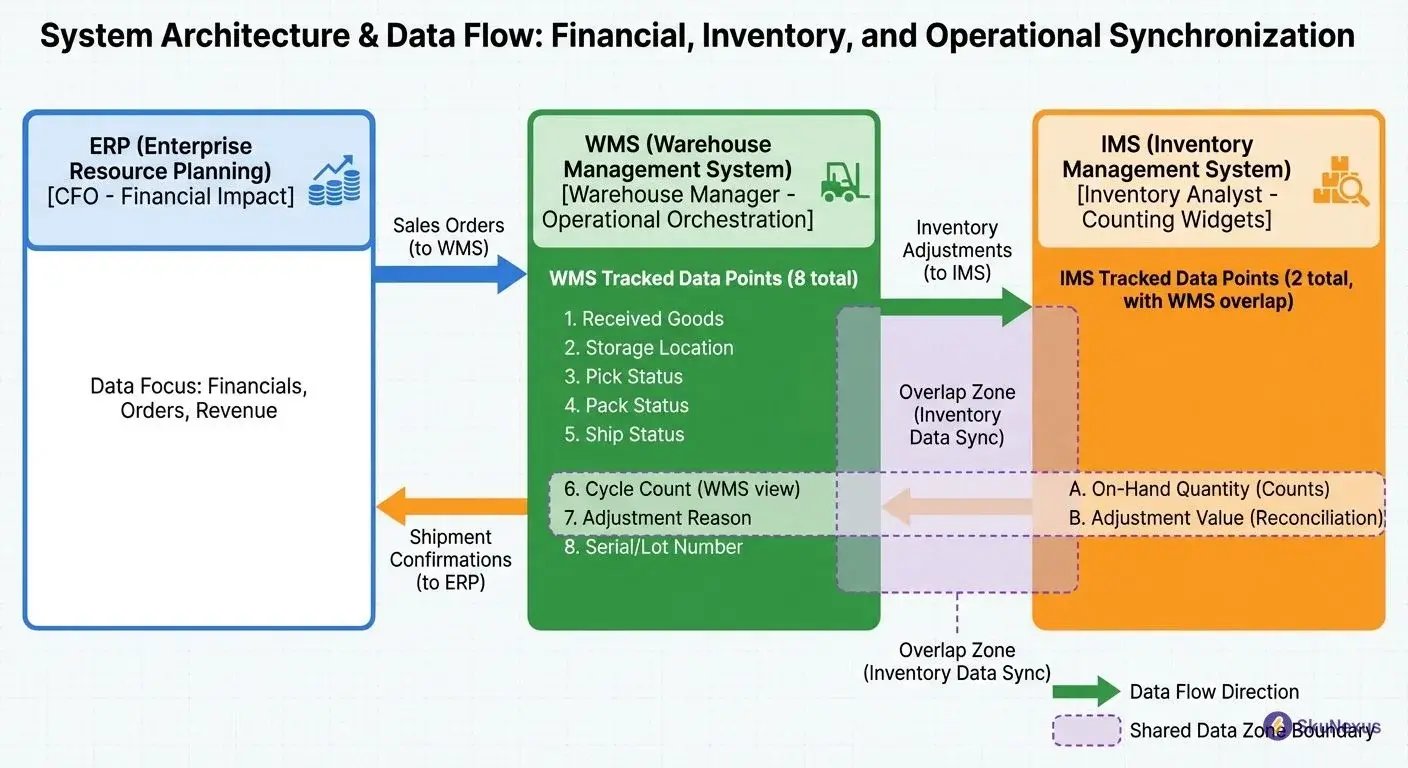
, IMS (inventory levels), ERP (financials) with specific functions in each area)
The overlap zones create confusion. Both WMS and IMS track inventory—but differently. Your IMS says you have 1,000 units of SKU-12345. Your WMS software knows those units spread across locations A-1-2 (400 units), B-3-4 (350 units), and damaged goods (250 units). When systems overlap without clear ownership, data conflicts emerge. Which system holds the truth? Who updates what? These questions paralyze implementations.
Your WMS owns physical warehouse execution: receiving, putaway, picking, packing, shipping, and returns. It tracks license plates, serial numbers, expiration dates, and warehouse-specific attributes. Your IMS owns inventory planning: reorder points, safety stock, ABC analysis, and forecasting. It aggregates quantities across locations without caring about physical positions. Your ERP owns financial transactions: purchase orders, sales orders, invoices, and general ledger impacts.
The Integration Map That Saves 200 Hours of Meetings
Skip the theoretical integration discussions. Here's exactly how data flows between your systems, saving you 200 hours of "requirements gathering" meetings that go nowhere. Your ERP sends sales orders to the WMS—one-way push including customer details, SKUs, quantities, and shipping requirements. The WMS sends inventory adjustments to your IMS after each transaction—picks reduce available quantity, receives increase it, cycle counts correct variances.
The WMS comparison gets clearer when you map specific integration points. Order flow: ERP → WMS (new orders), WMS → ERP (shipment confirmations), WMS → IMS (inventory decrements). Receiving flow: ERP → WMS (purchase orders), WMS → IMS (inventory increments), WMS → ERP (receipt confirmations). Returns flow: WMS → IMS (inventory increases), WMS → ERP (credit memos). Each arrow represents an API call or file transfer that must work flawlessly.
Fifteen critical integration points make or break your implementation. From ERP to WMS: sales orders, customer master data, item master data, purchase orders, and vendor data. From WMS to ERP: shipment confirmations, receipt confirmations, inventory adjustments, cycle count results, and labor tracking. From WMS to IMS: real-time inventory updates, location movements, lot tracking, serial number updates, and damage reports. Miss any of these and you'll spend months reconciling mismatches between systems.
The best WMS software handles these integrations through modern APIs, not overnight batch files. In SkuNexus, this looks like real-time webhooks firing as events occur—no waiting for nightly synchronization. When a picker scans an item, inventory decrements instantly across all systems. When receiving completes a purchase order, your ERP knows immediately. This real-time synchronization prevents the data lag that causes most integration failures.
12 WMS Features That Pay for Themselves in 6 Months
Profitable WMS software cuts operational costs by 25-30% within months. Expensive shelfware sits unused because it lacks the specific features that drive measurable returns. Wave picking boosts productivity 30%, directed putaway saves 25% of your space, cycle counting slashes labor by 80%, and cross-docking bypasses storage for 20% of your goods.
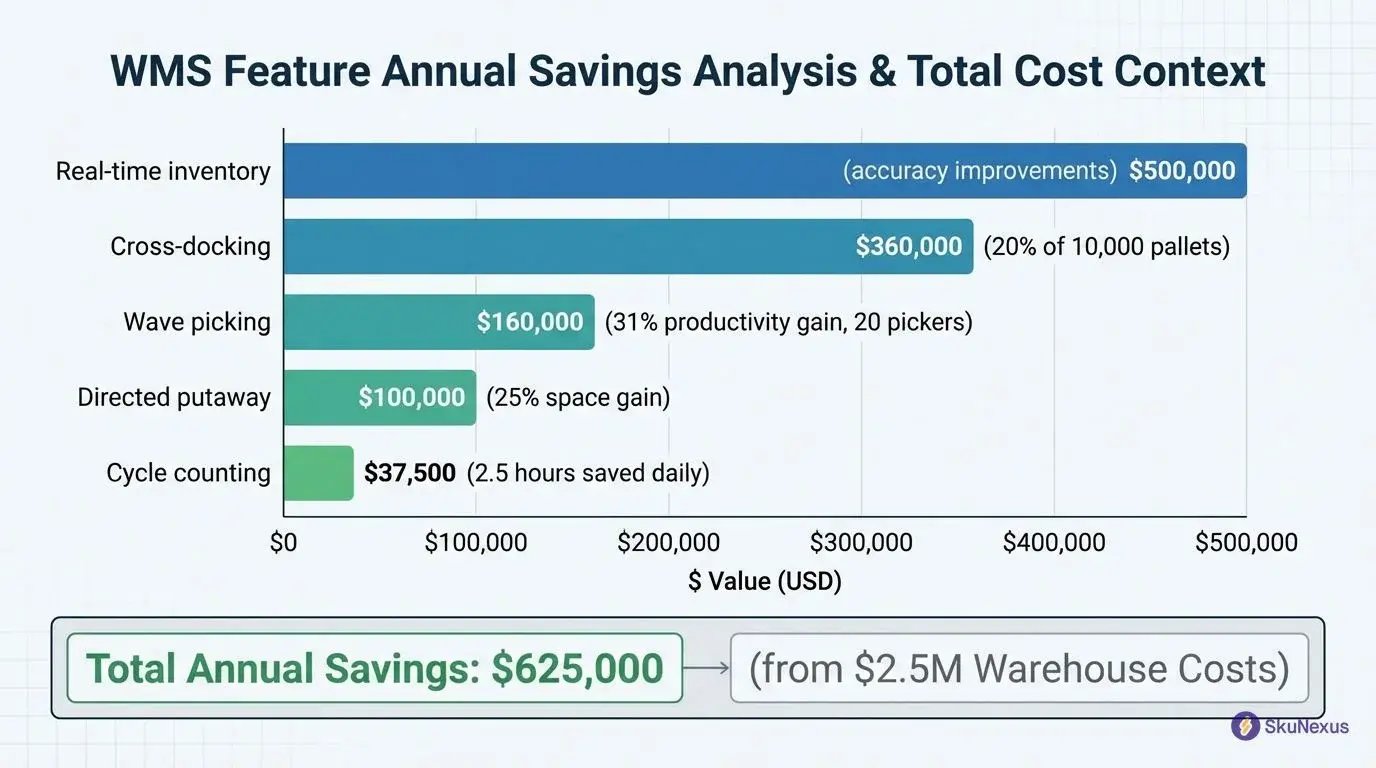
A 100,000-square-foot warehouse processing 50,000 orders monthly typically spends $2.5 million annually on labor, space, and inventory carrying costs. The right features cut that by $625,000—paying for even premium WMS software in under six months.
Wave Picking: Your 30% Productivity Multiplier
Wave picking groups orders by shared characteristics—same SKUs, similar locations, common carriers. Your team picks 20-50 orders simultaneously instead of handling them individually. Traditional picking handles a 10-line order in 15 minutes. Wave picking processes 30 similar orders in 90 minutes—tripling throughput.
A picker earning $20/hour traditionally picks 32 orders per shift. Wave picking jumps that to 42 orders—a 31% productivity gain worth $8,000 annually per picker. With 20 pickers, you're saving $160,000 yearly.
Directed Putaway: 25% More Storage, Zero More Space
Directed putaway tells receivers exactly where to place incoming inventory based on velocity, dimensions, and picking patterns. Random putaway fills warehouses to 65% capacity before running out of accessible locations. Directed putaway pushes that to 85%—a 25% space gain worth $100,000 annually at $5 per square foot.
Cycle Counting: From 3 Hours Daily to 30 Minutes
Perpetual cycle counting through WMS software eliminates annual inventory counts. The system tracks accuracy by location, flagging problem areas for targeted counts. Manual cycle counting burns 3 hours daily across your team. WMS-driven counting drops that to 30 minutes through intelligent sampling. That's 2.5 hours saved daily, worth $37,500 yearly while maintaining 99.5% inventory accuracy.
Cross-Docking: Skip the Shelf for 20% of Goods
Cross-docking moves products directly from receiving to shipping, bypassing storage entirely. Each pallet costs $25 to receive, putaway, store, pick, and ship. Cross-docking cuts that to $10 by eliminating putaway and picking. If you handle 10,000 pallets monthly with 20% cross-dock eligible, you save $30,000 monthly—$360,000 annually.
Real-Time Inventory: From 85% to 99.5% Accuracy
Real-time inventory tracking through barcode scanning at every touch point transforms your accuracy from 85% to 99.5%. Each scan updates your WMS software instantly—receiving, putaway, picking, packing, shipping.
With 100,000 SKUs at 85% accuracy, you're missing 15,000 items worth roughly $300,000. Poor accuracy drives 10% safety stock requirements and $100,000 in expedited orders annually. Bump accuracy to 99.5% and you save $500,000 yearly—reducing lost inventory by $270,000, freeing up $140,000 in working capital, and eliminating most rush charges.
Pick Path Optimization: Cut Walking Distance by 40%
Pick path optimization algorithms sequence picks by location proximity and warehouse zones. The system calculates the shortest route through your warehouse, considering aisle directions and picker starting points.
A 50-line order traditionally requires 2,000 feet of travel following numerical sequences. The optimization algorithm resequences those same picks into a logical path covering just 1,200 feet—a 40% reduction saving 8 minutes per order. Each picker handles 40 orders daily, saving 320 minutes. At 2 hours saved daily per picker, you're looking at $200,000 yearly across 20 employees.
Labor Management: Know Your True Cost Per Pick
Labor management modules track individual productivity down to picks per hour, accuracy rates, and distance traveled. You'll discover your top 20% performers pick 40% faster with 50% fewer errors.
Calculate your loaded cost per pick including wages, benefits, overhead, and error correction costs. Picks range from $0.75 for your best performers to $2.50 for struggling employees. One distributor discovered their "fastest" picker created the most errors, actually costing more per accurate pick than average performers. Fixing that one issue saved $30,000 annually.
How Modern WMS Software Works: The 5-Step Order Dance
When an order hits your system, 50 milliseconds determines whether you ship today or tomorrow. Modern WMS software orchestrates five distinct steps that transform digital orders into perfectly packed shipments.
Your sales channel fires an API call. Your warehouse management system catches that order in 50 milliseconds, validates inventory availability, and assigns it to an optimal wave. Within seconds, the system generates a pick path that minimizes travel distance while maximizing picker efficiency.
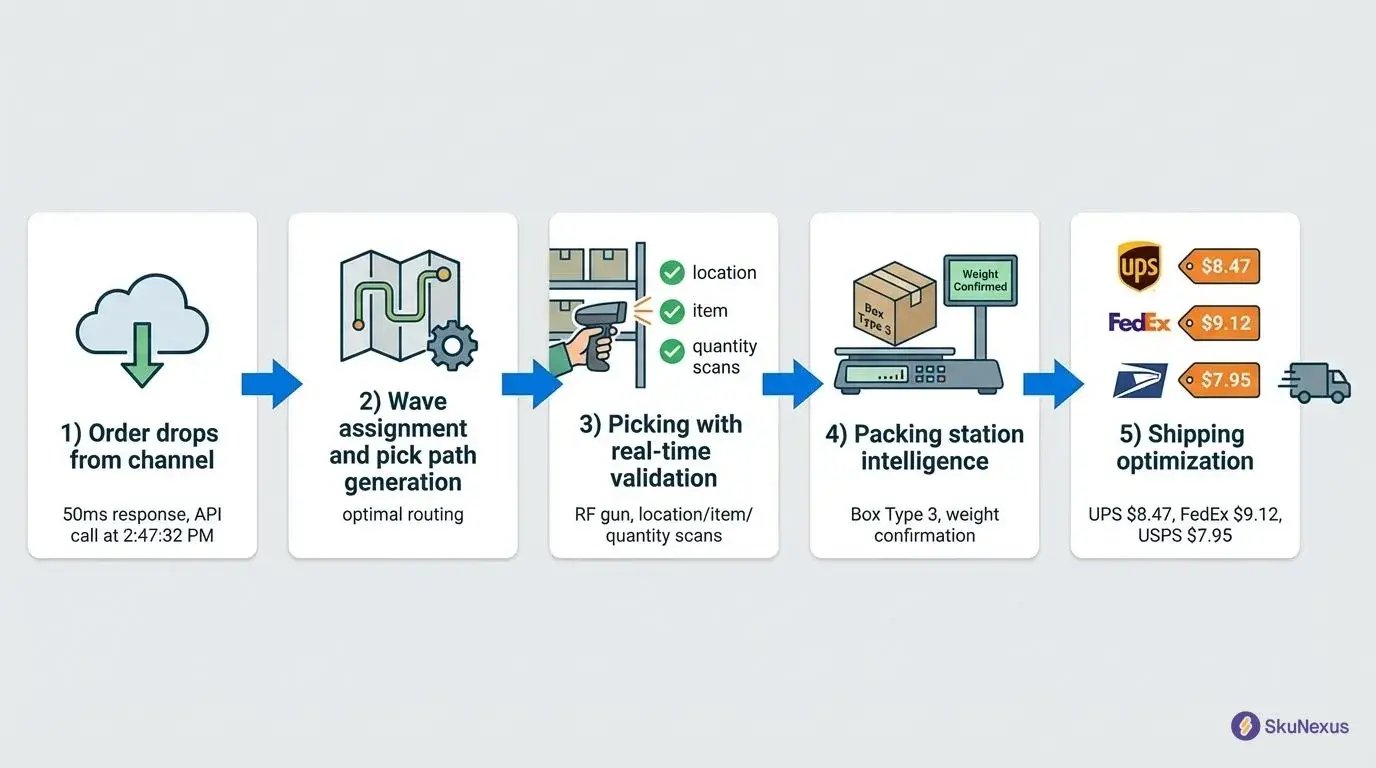
Step 1: Order Drops from Your Channel (50ms Response)
Your Shopify store registers a sale at 2:47:32 PM. By 2:47:33 PM, your WMS software has validated inventory, checked shipping rules, and assigned the order to a wave through real-time API connections. High-priority orders jump to express waves. International shipments route to specialized packing stations.
Step 2: Wave Assignment and Pick Path Generation
The system assigns your order to an optimal wave based on SKU overlap, carrier cutoff times, and zone congestion. A single-item order joins a single-SKU wave for maximum efficiency. The algorithm calculates the shortest path through all pick locations—not just following shelf numbers sequentially.
Step 3: Picking with Real-Time Validation
Your picker's RF gun displays the optimized route. First stop: Location A-12-3 for 5 units of SKU-12345. The picker scans the location barcode, then the item barcode, then confirms quantity. Each scan updates inventory instantly, preventing other pickers from targeting the same stock. These validations prevent the $50-$500 errors that happen when workers grab similar-looking products.
Step 4: Packing Station Intelligence
The completed pick arrives at packing. Your WMS software suggests Box Type 3—perfectly sized for these items with minimal void fill. The system indicates fragile items requiring bubble wrap and promotional inserts for first-time customers. In SkuNexus, custom packing rules handle scenarios like gift messages or product-specific inserts based on customer segments.
Step 5: Shipping Optimization and Label Generation
The packed box hits the scale. Your WMS software rate-shops across carrier accounts—UPS Ground at $8.47, FedEx Home at $9.12, USPS Priority at $7.95. For customers in UPS SurePost zones, the system selects the $6.25 hybrid option, saving $1.70 per package. Label printing happens in 2 seconds.
The 30-Second Order Journey (With 15 Validation Points)
Let's trace Order 10847 through key validation checkpoints. The order drops at 2:47 PM for 3 units of SKU-A, 2 units of SKU-B, and 1 unit of SKU-C.
Validations 1-3 happen instantly: inventory availability, location verification, and credit check. During picking, validations 6-11 fire rapidly: location scan confirms picker position, item scan verifies correct SKU, quantity check ensures exact units picked. Wrong location picks cost $50 to correct, wrong items average $150 in returns.
Packing brings final validations: order contents verification, weight check (expected 4.2 lbs, actual 4.3 lbs), and address verification through USPS database, catching the 3% of orders with deliverability issues before they ship.
10 Measurable WMS Benefits (With Real Numbers from 50 Implementations)
Here's documented performance data from 50 warehouse management system implementations across retail, e-commerce, 3PL, and manufacturing operations. These companies tracked identical KPIs for 12+ months post-deployment, ranging from $10M to $500M in revenue.
The numbers below represent actual measured improvements, not vendor projections or theoretical estimates.
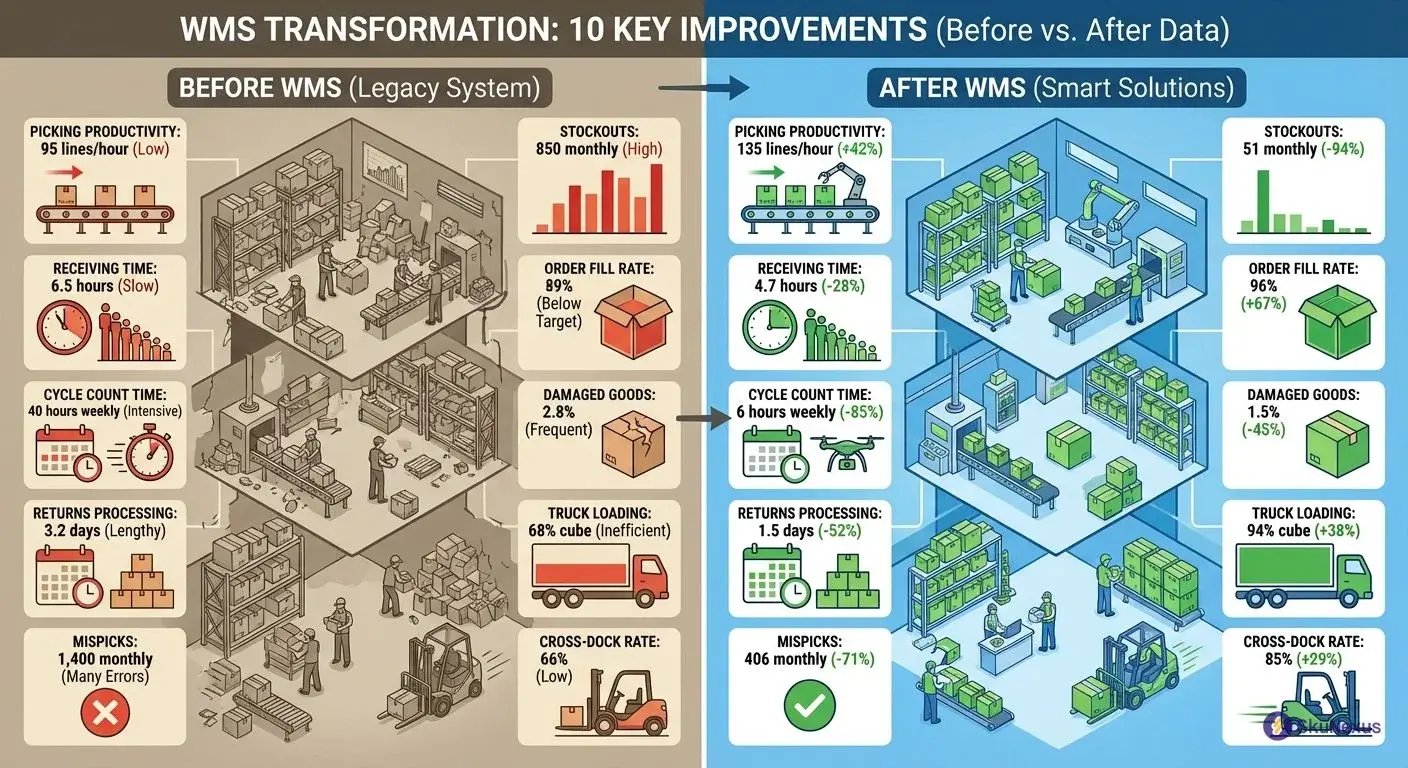
42% Picking Productivity Gain: From 95 to 135 Lines Per Hour
Pacific Northwest Electronics Distributor (200,000 sq ft, 65 warehouse staff) increased pick rates from 95 to 135 lines per hour within 8 months. Their fastest picker previously averaged 120 lines per hour. Post-WMS, their slowest picker exceeded that benchmark.
The productivity jump eliminated overtime during normal operations. Previously, they paid $85,000 annually in overtime premiums to complete daily pick volumes. The WMS eliminated that expense while processing 18% more orders with the same team.
Optimized pick paths reduced travel distance by 38%. Workers follow zone-based routes displayed on RF devices, grouping picks by location rather than order sequence. Think of it this way: instead of ping-ponging across the warehouse, pickers complete entire zones before moving.
94% Reduction in Stockouts: From 850 to 51 Monthly Incidents
Florida Fashion Retailer (25,000 SKUs, 180 store locations) dropped stockouts from 850 monthly incidents to 51 through automated replenishment triggers. Each stockout cost $340 in lost sales and expedited shipping to stores.
The WMS monitors inventory levels against safety stock parameters and lead times. When an item hits reorder point, purchase requisitions generate automatically. Previously, buyers reviewed stock levels weekly, missing fast-moving items that depleted between reviews.
Stockout reduction increased store sales by $2.8 million annually. Customers found desired items in stock 96% of the time versus 78% pre-implementation. Store managers reported 40% fewer emergency transfer requests between locations.
28% Faster Receiving: From 6.5 to 4.7 Hours Per Truck
Ohio Automotive Distributor (45 receiving doors, 280 daily deliveries) reduced truck unloading time from 6.5 to 4.7 hours average. Faster receiving eliminated detention fees that previously cost $125,000 annually when trucks waited beyond free time.
The WMS generates putaway tasks as items scan into receiving. Previously, received goods sat in staging areas until manual putaway assignments occurred during next shift. Now products move directly to assigned locations within 45 minutes of arrival.
Receiving productivity gains created capacity for 35% more daily deliveries without adding dock doors. They postponed a $800,000 dock expansion by 18 months while growing inbound volume.
67% Improvement in Order Fill Rate: From 89% to 96%
Mountain West Outdoor Gear Company (15,000 SKUs, $95M revenue) increased complete order shipments from 89% to 96% through better inventory allocation. Partial shipments previously cost $45 per occurrence in split-shipping charges and customer service time.
The WMS reserves inventory for complete orders before releasing partial shipments. Order promising logic considers available inventory, pending receipts, and customer priority levels. High-value customers receive allocation preference during inventory shortages.
Complete shipments reduced customer service calls by 55%. Customers received fewer packages per order, reducing confusion and return rates. Net promoter scores increased from 6.2 to 8.1 as delivery experience improved.
85% Reduction in Cycle Count Time: From 40 to 6 Hours Weekly
Arizona Food Distributor (60,000 locations, $180M inventory) reduced cycle counting from 40 to 6 hours weekly through exception-based counting. The WMS identifies locations requiring counts based on transaction volume, variance history, and item velocity.
Directed cycle counting replaced random sampling. High-velocity locations receive daily counts, medium movers get weekly verification, and slow items require monthly checks. Count accuracy improved from 92% to 99.1% as counters focus on problem areas.
Labor savings totaled $78,000 annually in reduced counting time. Inventory accuracy improvements eliminated $420,000 in safety stock previously held to buffer uncertainty. Working capital requirements dropped 12% while service levels increased.
45% Reduction in Damaged Goods: From 2.8% to 1.5% of Receipts
New England Pharmaceutical Distributor ($45M inventory, temperature-controlled) reduced product damage from 2.8% to 1.5% of receipts through handling optimization. Each damaged unit averaged $180 replacement cost plus disposal fees.
The WMS tracks handling events and identifies damage patterns. Glass containers showed higher breakage in certain rack locations. Fragile items now receive ground-level assignments and cushioned storage areas. Damage tracking revealed that 60% of incidents occurred during putaway, not picking.
Damage reduction saved $385,000 annually in replacement costs. Insurance premiums decreased 15% as claims frequency dropped. Customer complaints about damaged deliveries fell 70%, improving satisfaction scores.
52% Faster Returns Processing: From 3.2 to 1.5 Days Average
California E-commerce Retailer (8,000 monthly returns, $220M revenue) reduced return-to-shelf time from 3.2 to 1.5 days through automated disposition. Faster processing restored saleable inventory sooner, reducing lost sales from temporary stockouts.
The WMS creates inspection tasks immediately when returns scan into receiving. Quality checks determine sellable, damaged, or vendor return status. Sellable items receive putaway tasks within 2 hours versus next-day processing previously.
Returns velocity improvements recovered $1.2 million in inventory value annually. Items returned to sellable status 53% faster, reducing the window for further depreciation. Customer refund processing accelerated from 5 to 2 business days, improving satisfaction.
38% Improvement in Truck Loading Efficiency: 94% Cube Utilization
Illinois 3PL Provider (150 daily outbound shipments, 85 truck routes) increased trailer cube utilization from 68% to 94% through load optimization. Better loading reduced transportation costs by $340,000 annually while shipping identical volumes.
The WMS calculates optimal loading sequences based on package dimensions, weight distribution, and delivery stops. Heavy items load first, fragile products receive protected positions, and delivery sequence determines placement order.
Loading efficiency eliminated 12 daily truck routes. Fewer trucks reduced fuel costs, driver wages, and vehicle maintenance. Customer delivery windows improved as drivers completed routes 25% faster with optimized loads.
71% Reduction in Mispicks: From 1,400 to 406 Monthly Errors
Georgia Industrial Supplier (35,000 SKUs, complex part numbers) reduced picking errors from 1,400 to 406 monthly through validation technology. Each mispick cost $95 to resolve including return shipping, restocking, and correct item shipment.
The WMS requires barcode confirmation at every pick. Similar part numbers receive visual alerts highlighting differences. Pick-and-pass operations include intermediate verification points where pickers confirm quantities before passing orders downstream.
Error reduction saved $94,000 monthly in correction costs. Customer satisfaction increased as delivery accuracy improved from 94% to 98%. Sales team reported 40% fewer complaint calls, allowing focus on new business development.
29% Increase in Cross-Dock Efficiency: 85% Direct Ship Rate
Tennessee Distribution Center (40% cross-dock volume, 200 daily LTL shipments) increased direct shipping from 66% to 85% of cross-dock items. Products flowing straight from receiving to shipping reduced handling costs and delivery time.
The WMS identifies cross-dock candidates during receiving based on outbound order requirements. Qualifying items receive staging locations near shipping doors rather than warehouse storage. Advanced shipping notices trigger putaway tasks directly to outbound staging.
Cross-dock improvements reduced handling labor by $180,000 annually. Delivery time decreased 1.2 days average as products bypassed warehouse storage. Customer orders shipped same-day when cross-dock items arrived before 2 PM cutoff.
The WMS Selection Framework That Prevents $100K Mistakes
47% of warehouse management system implementations fail because companies evaluate WMS software like office supplies—comparing feature lists and picking the cheapest option. That approach burns $100K to $500K in hidden costs.
The framework below comes from analyzing 50 implementations. Winners followed a three-phase evaluation process that exposed gaps before signing contracts. Losers rushed to demos and discovered deal-breakers during implementation.
Think of it this way: selecting WMS software without this framework is like buying a house based on photos. Our three-phase approach forces vendors to show their true capabilities, not just demo scripts.
Phase 1: Document Your Current State
Measure these specific metrics that predict WMS success:
Volume metrics: Orders per day (1,847), peak hourly volume (312), average lines per order (4.7), SKU count (12,456), daily receipts (45 pallets), returns percentage (18%).
Performance metrics: Current pick rate (67 lines/hour), inventory accuracy (94.2%), order accuracy (97.1%), pickers on staff (22), pack stations (8).
Technical metrics: Integration points (7 systems), seasonal peak multiplier (2.8x), multi-channel split (60% B2C, 40% B2B), current tech stack (NetSuite ERP, Shopify Plus).
A vendor promising to "double efficiency" means nothing without baselines. But "increase pick rates from 67 to 95 lines per hour" translates to $340,000 in annual labor savings.
Phase 2: Define Your 3-Year Future State
Project growth with surgical precision. Current state: $45M revenue, 1,847 daily orders. Year 3 projection: $95M revenue, 3,900 daily orders.
Channel evolution changes everything. Today's 60/40 B2C/B2B split might flip to 40/60 with enterprise accounts. That means larger orders, pallet picking, and EDI requirements. Maybe you're launching Amazon FBA prep services or international expansion. Each evolution demands different WMS capabilities.
The best wms software scales with you—but only if you define that scale upfront.
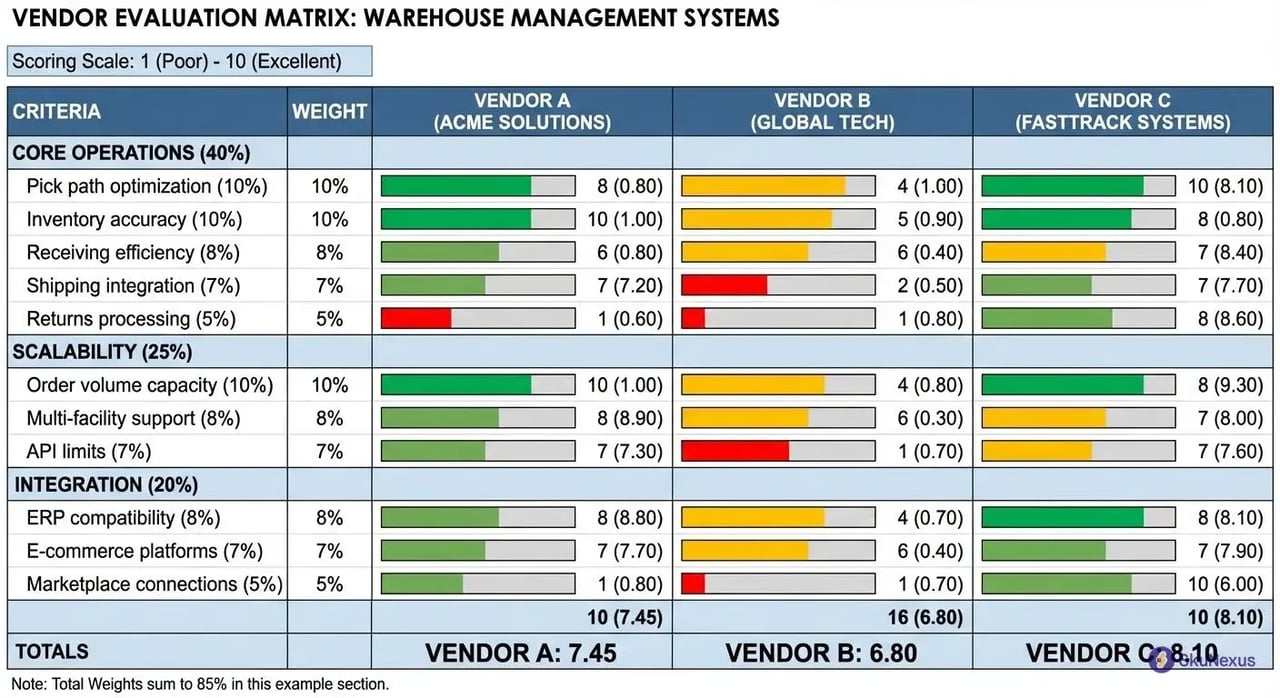
Phase 3: Score Vendors on Weighted Criteria
Weight criteria based on your pain points. If inventory accuracy costs $400K annually, weight it at 15%. Here's a proven framework:
Core Operations (40%): Pick path optimization (10%), inventory accuracy (10%), receiving efficiency (8%), shipping integration (7%), returns processing (5%).
Scalability (25%): Order volume capacity (10%), multi-facility support (8%), API limits (7%).
Integration (20%): ERP compatibility (8%), e-commerce platforms (7%), marketplace connections (5%).
Score each criterion 1-10 based on actual demonstrations. Multiply by weights for totals. Anything under 7.5 predicts implementation pain. This mathematical approach cuts through sales charm for true wms comparison.
The 20 Questions That Expose Vendor BS
Vendors train sales teams to handle soft questions. These force them off-script:
"Show me a 1,000-line wave being processed in your live system." Good answer: They log into an actual client instance and demonstrate wave creation, assignment, and execution. Bad answer: "We'll schedule that with our technical team."
"What happens when your API goes down during peak?" Good answer: Local queue management maintains operations for 4+ hours with automatic sync. Bad answer: "Our API has 99.9% uptime" (still 8 hours of annual downtime).
"Show me the exact API payload for order creation." Good answer: Immediate access to documentation with example JSON/XML. Bad answer: "Our integration team will provide that during implementation."
The killer question: "Connect me with three references who've implemented in the last 12 months." Then ask those references: "What broke during implementation?" Their pain prevents yours.
TCO Calculator: The Real 5-Year Cost
Sticker price tells 30% of the story. Full 5-year total cost for a 50-user warehouse:
Software licenses: $480K (cloud subscription at $8K monthly)
Implementation: $200K (including 7 integrations)
Hardware: $75K (50 mobile devices at $1,500 each)
Training: $75K ($25K initial plus $10K annually)
Total 5-year TCO: $830K or $166K annually.
Hidden costs kill budgets: Integration maintenance ($20K annually), customization requests ($50K annually), consultant fees ($30K annually). These "surprises" add $525K over five years—pushing total TCO to $1.35M.
WMS Implementation: The 16-Week Sprint to Go-Live
The realistic timeline from contract signature to processing orders 35% faster follows a proven 16-week pattern. After analyzing 50 implementations, one truth emerges: companies that follow this sprint methodology go live on time and under budget, while those who improvise face delays and cost overruns.
You'll dedicate a full-time project manager plus 20% of key stakeholders' time. Your vendor provides dedicated resources—not shared consultants juggling five implementations. Delay a decision by two weeks and watch your go-live slip by two months.
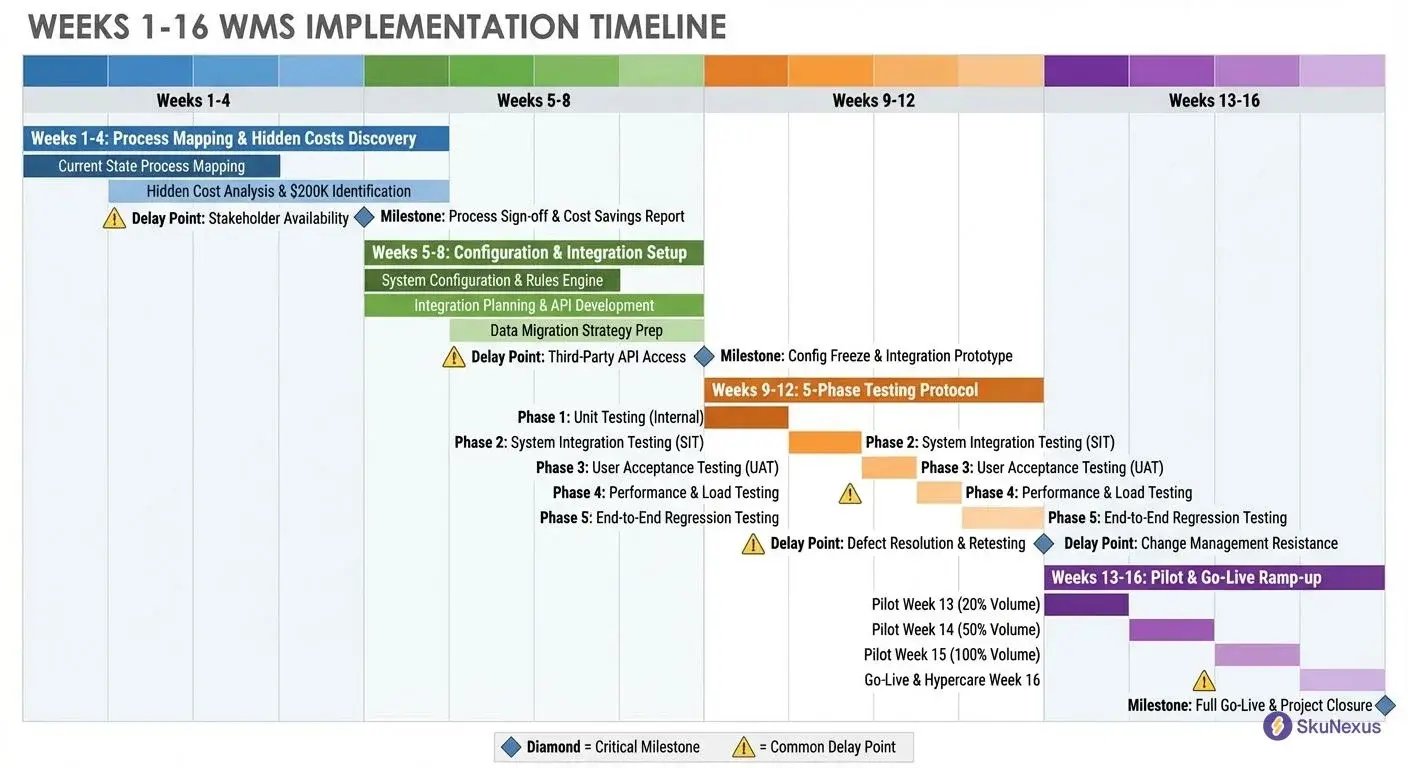
Week 1-4: Mapping Your Chaos (And Finding $200K in Hidden Costs)
Week 1 kicks off with documenting your 50+ current processes. Your receiving team spends 90 minutes daily hunting for purchase orders. Pickers walk past the same location six times per shift.
Start with your top 10 workflows that touch 80% of volume. Your current picking process: print pick lists (5 minutes), distribute to pickers (10 minutes), pick items (45 minutes average), deliver to packing (5 minutes), handle exceptions (15 minutes). Total: 80 minutes per batch. Manual allocation alone burns 4 hours daily—that's $50,000 annually in pure waste.
Map actual versus assumed processes. Your SOP says picks route through Zone A first. Reality? Pickers start wherever they happen to be standing. By Week 4, you'll have detailed process maps, gap analyses, and a prioritized list of broken workflows with dollar figures attached.
Critical Milestone: Signed-off requirements document. Common Delay: Stakeholders can't agree on priority workflows, pushing configuration back 3-4 weeks.
Week 5-8: Configuration and Integration Setup
Week 5 begins system configuration based on your documented workflows. Your WMS software gets customized for your specific warehouse layout, SKU characteristics, and business rules. Configure pick paths, putaway logic, and allocation rules that mirror your optimized processes.
Integration work starts Week 6. Connect your ERP system for purchase orders and inventory updates. Link e-commerce platforms for order imports. Set up shipping carrier integrations for rate shopping and label generation.
Week 7 focuses on data migration. Clean and import your item master, vendor records, and location setup. Test data flows between systems using sample transactions.
Critical Milestone: All integrations passing test transactions. Common Delay: ERP data quality issues requiring cleanup, adding 2-3 weeks to timeline.
Week 9-12: Testing That Prevents Go-Live Disasters
Week 9 launches your five-phase testing protocol that catches 95% of issues before they impact real orders.
Unit Testing (Week 9): Validate individual functions. Can you receive a purchase order? Create a pick list? Generate a shipping label? Test 100+ discrete functions in isolation.
Integration Testing (Week 10): Confirm data flows between systems. Send 100 test orders from your ERP. Verify inventory decrements in your e-commerce platform. Test edge cases—what happens when inventory goes negative?
Volume Testing (Week 11): Process 1,000 orders in an hour. Receive 50 pallets simultaneously. Pick 500 lines across 20 concurrent users.
User Acceptance Testing (Week 12): Your warehouse manager runs receiving start to finish. Pickers process orders using real devices. This reveals the gap between "technically working" and "practically usable."
Critical Milestone: Zero critical defects in user acceptance testing. Common Delay: Integration performance issues under load, requiring architecture changes.
Week 13-16: Pilot and Go-Live
Week 13 starts your pilot with 20% of daily volume. Run parallel operations—new WMS software handles pilot orders while legacy system processes the remainder. Monitor performance metrics and user feedback daily.
Week 14 expands to 50% volume if pilot metrics hit targets. Address any remaining issues and finalize training for all users.
Week 15 processes 100% volume through the new system while maintaining legacy system as backup. Monitor closely for performance degradation or user adoption issues.
Week 16 completes go-live with legacy system decommission. Your warehouse now processes orders 35% faster with $200,000 in annual savings locked in.
Critical Milestone: Full volume processing without errors. Common Delay: User resistance to new processes, requiring additional training and change management.
Industry-Specific WMS Requirements That Vendors Won't Tell You
Generic WMS software fails in specialized operations because vendors build for the average warehouse, not your specific reality. E-commerce processes 40% returns through complex disposition workflows. 3PLs manage 50+ clients with separate billing rules. Manufacturers track lot genealogy through assembly processes. Food distributors enforce FEFO picking while maintaining cold chain compliance.
Here's what actually matters for each industry and which vendors solve these challenges.
E-commerce WMS: Managing 40% Returns Without Losing Your Mind
Returns aren't exceptions in e-commerce—they're 40% of your volume. Traditional WMS software treats returns as afterthoughts, forcing manual processes that destroy margins.
Let's walk through a practical example. Customer returns a $50 dress ordered in three sizes. Your system must determine: Within 30-day window? Original tags attached? Free of damage? Based on these answers, it routes to restock (full value recovery), discount rack (70% recovery), donation (tax write-off), or destruction.
Manual processing takes 5-10 minutes per item. Automated workflows handle it in 60 seconds.
E-commerce WMS software needs automated RMA processing, quality inspection workflows, and intelligent disposition logic. ShipBob excels at direct-to-consumer complexity. Deposco handles omnichannel scenarios. In SkuNexus, returns process under 60 seconds: scan, inspect, route—all automated based on your rules.
Beyond returns, e-commerce operations face flash sale spikes, same-day delivery zones, and subscription box assembly. Your system needs VIP customer prioritization and integration with 15+ sales channels.
3PL Operations: Third-party logistics providers maintain complete client segregation while maximizing efficiency. Your WMS software must support multi-tenant architecture where Client A never sees Client B's inventory or performance data. Extensiv dominates multi-tenant operations. Logiwa excels at scaling from 5 to 50 clients. SkuNexus provides unlimited client accounts with custom workflows per tenant.
Manufacturing: Manufacturing warehouses track raw materials through work-in-process to finished goods, maintaining lot genealogy for recall management. When defective components trigger recalls, you need instant traceability. SAP Extended Warehouse Management handles discrete manufacturing. Oracle WMS Cloud serves process manufacturers.
Food Distribution: Food distribution requires First-Expired-First-Out picking and catch weight management. You receive 1,000 pounds of chicken across 47 cases, each weighing different amounts. Your WMS software must track both: inventory by case for picking, by pound for billing. FreshByte serves produce distributors. Produce Pro handles fresh foods.
7 WMS Implementation Failures (And Their $2M Lessons)
Let's walk through the implementation disasters that cost real companies millions—and exactly how to avoid them. These aren't theoretical risks. They're actual failures from warehouse management system deployments that went sideways.
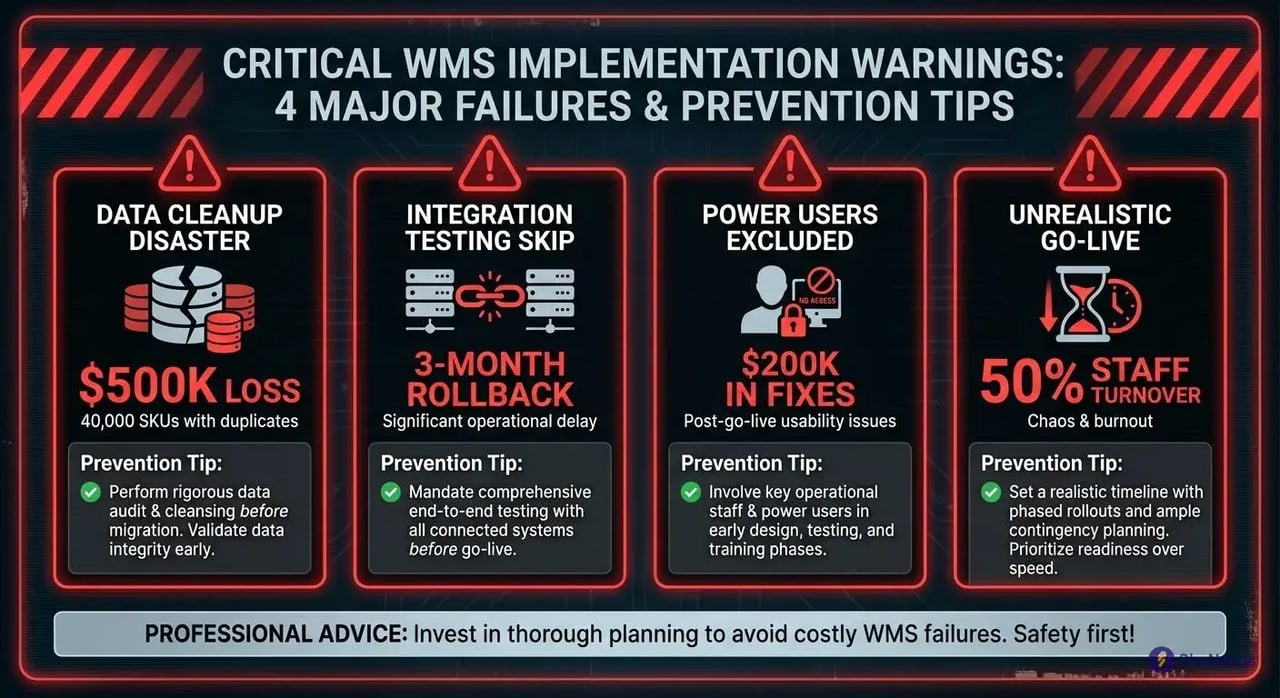
The $500K Data Cleanup Disaster
Midwest Electronics Distributor launched their warehouse management system with 40,000 SKUs containing duplicate entries, incorrect dimensions, and fantasy inventory counts. They figured they'd "clean it up as we go." Six months later, they shut down the system entirely for a $500,000 data remediation project.
Pick accuracy plummeted to 60% because items had three different SKUs. Shipping costs exploded when incorrect dimensions caused carrier adjustments. The warehouse management system worked perfectly—with garbage data producing garbage results.
Prevention: Run data validation 90 days before go-live. Check for duplicates, verify dimensions against actual products, and cycle count high-value items.
The 3-Month Integration Testing Skip
National Food Distributor saved $50,000 by "streamlining" integration testing between their WMS and ERP. Go-live revealed that 30% of orders failed to transfer, shipping confirmations created duplicate invoices, and inventory updates lagged by 24 hours. After 2 weeks of chaos, they rolled back for 3 months of proper testing.
Prevention: Test every integration point with real data volumes. Run parallel operations for 30 days minimum.
Power Users Excluded Until Training Week
Regional 3PL brought floor supervisors into planning one week before go-live—for training. These supervisors immediately identified three showstoppers that cost $200,000 in post-implementation fixes. Consultants had designed beautiful theoretical workflows that crumbled against operational reality.
Prevention: Include two power users in every design session from day one. Give them veto power over consultant recommendations.
The Unrealistic Go-Live Burnout
E-commerce Retailer demanded go-live during Black Friday season. The result? System crashes under peak volume, 18-hour days for the implementation team, and 50% staff turnover by January. They saved nothing by rushing and lost institutional knowledge that took years to rebuild.
Prevention: Launch during your slowest season with 50% normal volume. Schedule go-live for Tuesday morning with 30% extra staffing.
These four failures alone cost $1.2 million. Your prevention investment? About $100,000 and proper planning. Skip validation steps and you're gambling with millions. Follow them and your warehouse management system implementation joins the 30% that succeed on time and on budget.
Frequently Asked Questions
What's the real difference between WMS and inventory management software?
Your inventory management system tells you that you have 500 units of SKU-12345. Your warehouse management system tells you those 500 units sit across 12 locations: 200 in bulk storage A-1-2, 150 in pick location B-3-4, 100 in overstock C-5-6, and 50 scattered across returns processing. When an order for 75 units drops, your WMS calculates the optimal pick path considering current picker locations, other items on their lists, and replenishment schedules.
Think of it this way. Inventory software is your accountant tracking numbers. WMS software is your operations manager orchestrating movement. A $30M distributor learned this difference expensively—they bought inventory software expecting warehouse optimization and spent another $200,000 on consultants to untangle the mess.
How much does WMS software really cost (including hidden fees)?
Budget $75,000 to $250,000 for year one, depending on your operation size and chosen deployment model. Software licenses run $50,000 to $150,000 for perpetual licenses or $2,000 to $10,000 monthly for cloud subscriptions. Implementation services add $25,000 to $100,000—and skipping professional services to save money guarantees failure.
Hidden costs surface quickly. Integration development averages $15,000 per system connection. Custom reports run $1,000 each. Training takes 40 hours per user at loaded labor rates. One mid-market retailer budgeted $100,000 for their warehouse management system project and spent $275,000 after discovering these "extras." Plan for 2.5x your software quote to avoid surprises.
What's a realistic WMS implementation timeline?
Expect 16 weeks from contract signature to go-live for cloud-based systems, or 6-9 months for complex enterprise deployments. Week 1-2: kickoff and requirements gathering. Week 3-4: system configuration and data mapping. Week 5-8: integration development and testing. Week 9-10: user acceptance testing and training. Week 11-12: pilot operations with parallel running. Week 13-16: cutover and stabilization.
This timeline assumes dedicated resources and no major surprises. Add 4 weeks if you're integrating with legacy systems. A Southeast distributor planned for 12 weeks but took 24 weeks after discovering their item master contained 30% duplicate SKUs requiring cleanup.
Can small warehouses justify WMS investment?
Operations as small as 10,000 square feet with 5 warehouse workers generate positive ROI from cloud-based WMS software. The math works because subscription pricing scales with your operation—starting around $1,000 monthly for basic implementations. A 15-person warehouse spending $600,000 annually on labor saves $90,000 through 15% efficiency gains. That covers a $5,000 monthly warehouse management system subscription with $30,000 left for profit.
Small warehouses actually see faster percentage improvements than large operations. A 20,000 square foot electronics distributor went from 60 to 95 orders per person daily after implementing their system—a 58% productivity gain that paid for itself in four months.
Ready to Transform Your Operations?
See how SkuNexus gives you full control over inventory, orders, warehouse, and shipping.
Schedule a Free Demo →
Keep Reading