How to Set Up Automated Order Routing in 5 Steps
What Is Automated Order Routing? The 3-Minute Overview
Manual order routing kills your margins. Every order sits in a queue while someone checks 6 inventory screens, calculates shipping costs, and maybe calls a warehouse. That's 8-12 minutes per order.
Three components eliminate this bottleneck:
Real-time inventory visibility tracks stock levels across every location. Live data. When someone buys your last blue widget in Store #47, the system knows instantly.
Rule-based decision engine applies your business logic to each order. Closest warehouse? Cheapest shipping? Fastest delivery? You set the priorities. The engine executes them in milliseconds.
Multi-location orchestration splits orders intelligently. Customer orders 3 items. Warehouse A has 2. Store B has 1. System automatically creates two shipments.
Manual routing: 8-12 minutes per order. Automated routing: 15 seconds. Same decision quality. 48x faster.

I watched a 50-store retailer clear 847 Monday morning orders in 3.5 hours. Manual routing would've taken 4 people all day. The software made 847 routing decisions while their team handled exceptions and customer service calls instead.
The 5-Step Process to Automate Order Routing
Automated routing takes 15 seconds per order. You'll make that switch in 4-6 weeks following these five steps.
Teams with clean data finish in 4 weeks instead of 6. Clean data means accurate inventory counts and validated shipping addresses from day one.
Step 1: Audit Your Current Order Flow (Week 1)
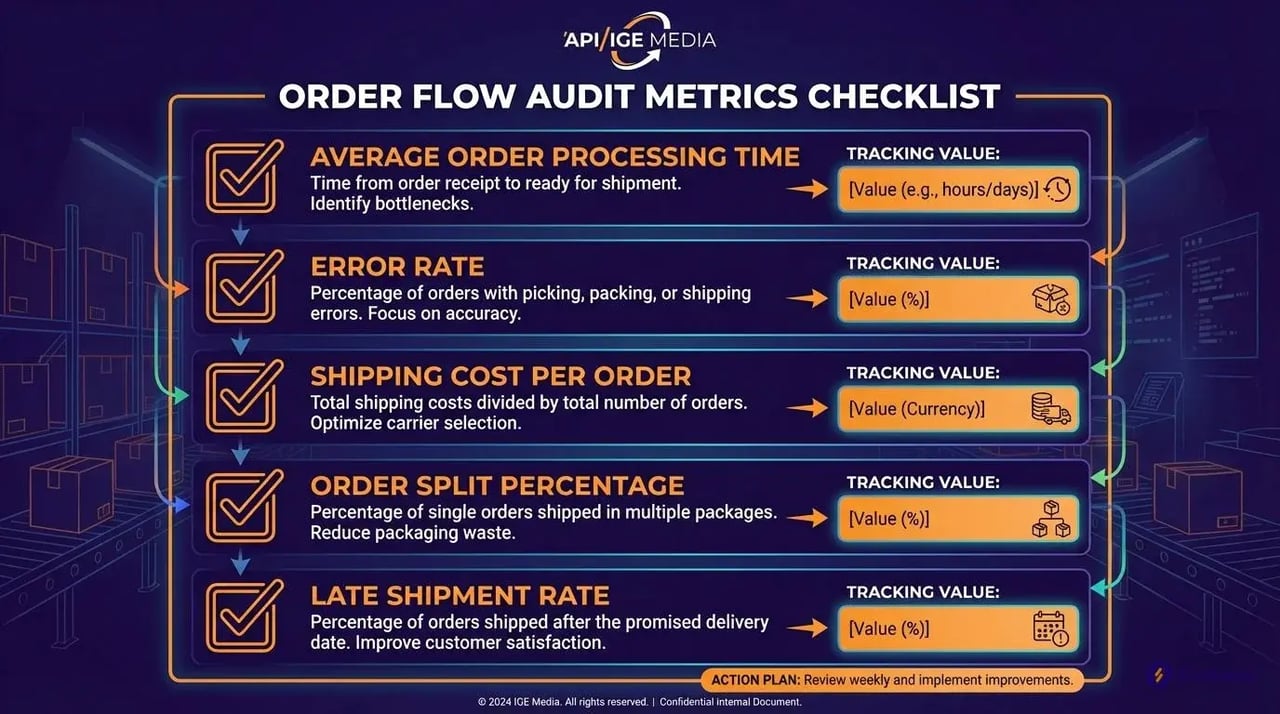
Start measuring these five metrics today:
- Average order processing time - Clock from order placement to shipment confirmation
- Error rate - Wrong warehouse selections, inventory mismatches, carrier mistakes
- Shipping cost per order - Include all fees, not just postage
- Order split percentage - How often you ship from multiple locations
- Late shipment rate - Orders missing their promised delivery date
Track every order for one full week. Use our downloadable audit checklist with columns for timestamp, order ID, processing steps, and bottlenecks.
Export your orders to spreadsheet. Add columns for "routing decision time" and "actual fulfillment location." Track who made each routing decision. Note when they override the system.
Step 2: Map Your Inventory Locations and Carriers (Week 2)
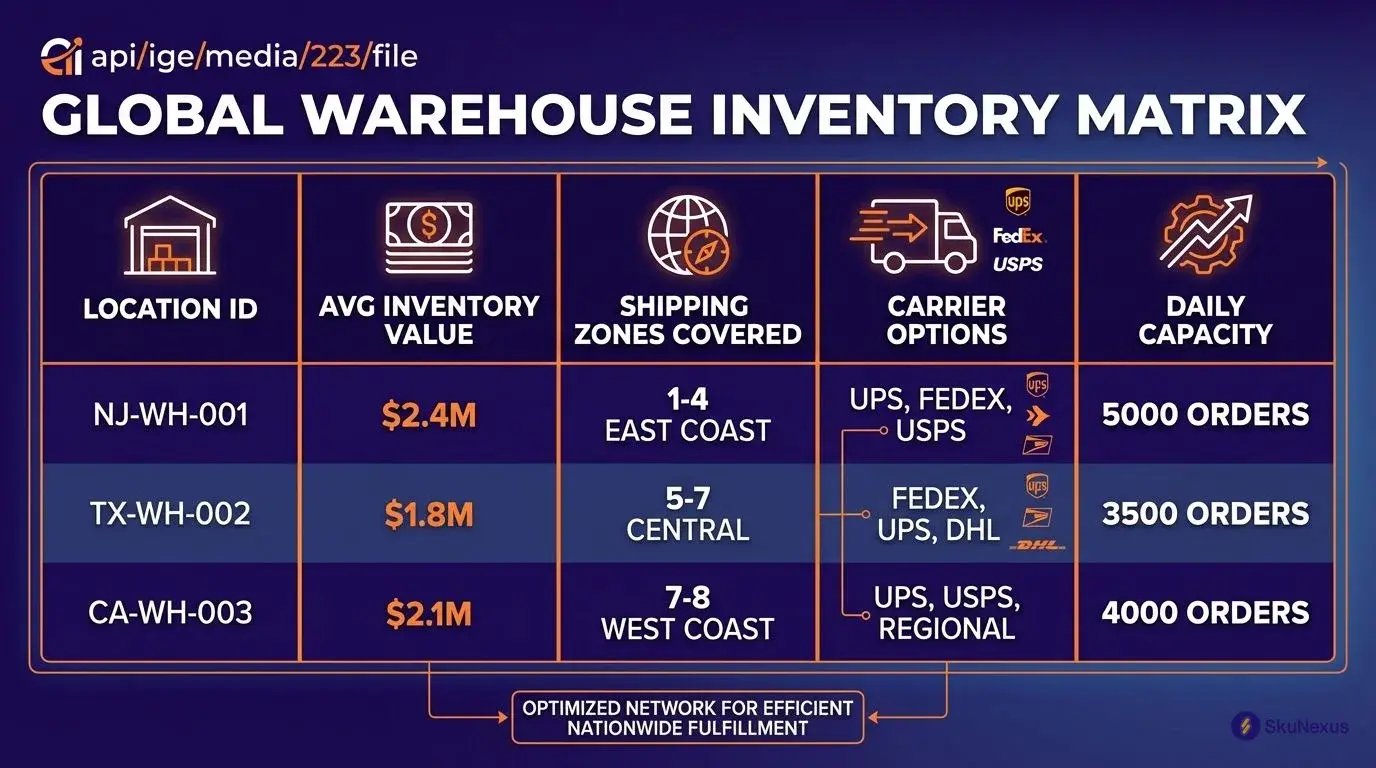
Build your inventory location matrix. Five essential columns:
| Location ID | Avg Inventory Value | Shipping Zones Covered | Carrier Options | Daily Capacity |
|---|---|---|---|---|
| NJ-WH-001 | $2.4M | 1-4 (East Coast) | UPS, FedEx, USPS | 5,000 orders |
| TX-WH-002 | $1.8M | 5-7 (Central) | UPS, FedEx, Regional | 3,500 orders |
| CA-WH-003 | $2.1M | 7-8 (West Coast) | FedEx, OnTrac, USPS | 4,000 orders |
Zone skipping saves money. Ship from Texas to California? Zone 7-8 costs $18.50 for 5 pounds. Ship from your California warehouse? Zone 1-2 costs $7.25.
Map every carrier's zone chart against your locations. Add stores to your matrix with their real capacity—not theoretical. That boutique in Denver might only hold 200 SKUs, but it covers Colorado orders faster than any warehouse.
Step 3: Define Your Order Routing Rules (Week 3)
Every automated system needs these five order routing rules:
1. Inventory availability threshold: 85%
Never route to locations with less than 85% certainty of stock. That 15% buffer covers pick errors, damages, and concurrent orders.
2. Shipping cost ceiling: $X per order
Set hard limits. We cap standard orders at $12 shipping cost. Anything higher triggers alternate location search.
3. Delivery time requirements
Priority orders route to locations meeting the deadline. Cost becomes secondary.
4. Carrier performance scores
Track on-time delivery by carrier and lane. Route away from carriers below 95% performance.
5. Special handling flags
Hazmat, oversized, fragile—these orders follow different rules. Flag them upfront.
Here's an actual rule configuration:
```
IF order_total > $100 AND delivery_speed = "standard"
THEN prioritize = "lowest_shipping_cost"
IF inventory_availability < 85% at primary_location
THEN check secondary_location
ELSE fulfill from primary_location
```
Start with five rules. Add complexity after the basics work.
Step 4: Connect Your Systems (Weeks 4-5)
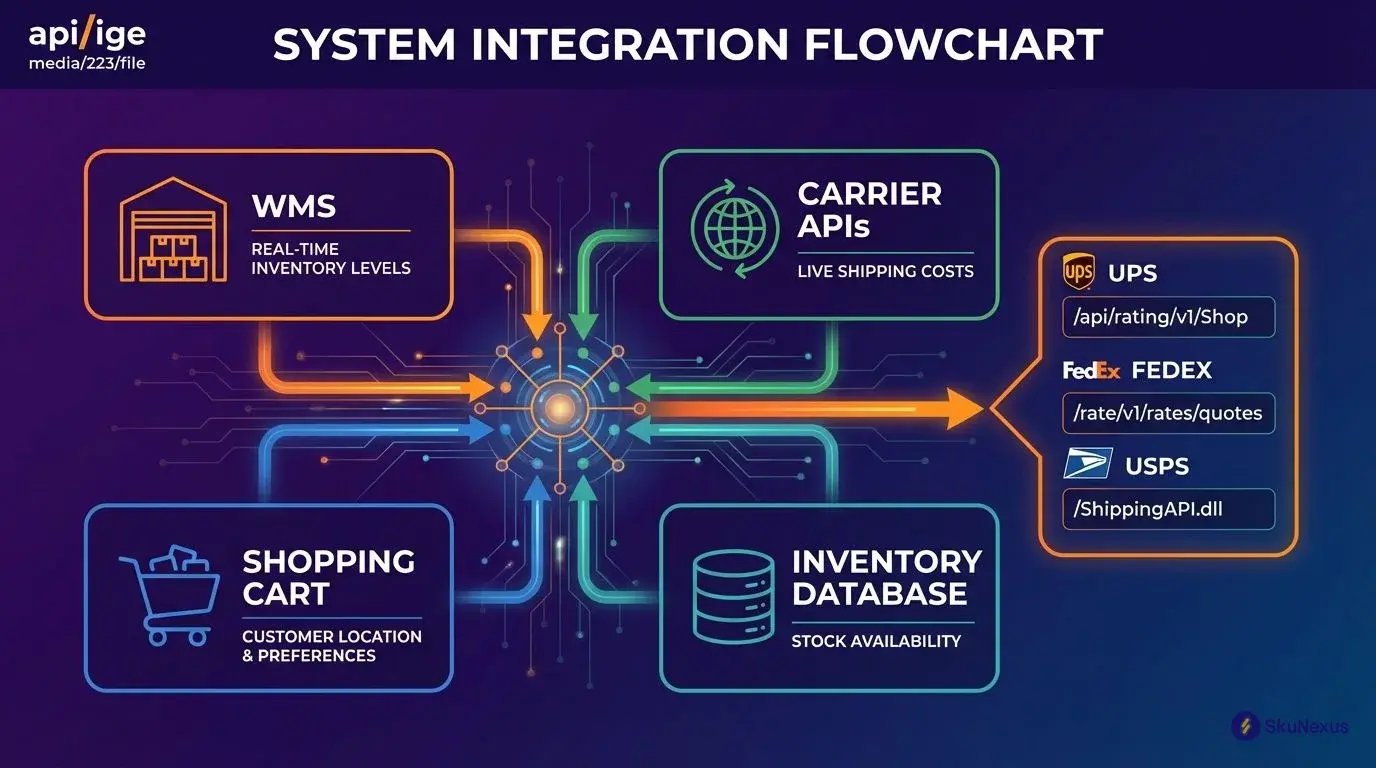
Your order routing system breaks without these four connections. Each one solves a specific problem that kills automation:
- WMS connection - Prevents routing to empty shelves with real-time inventory levels
- Shopping cart - Captures customer location and delivery preferences that drive routing decisions
- Carrier APIs - Stops manual rate shopping by pulling live shipping costs
- Inventory database - Eliminates stock-outs by checking all locations before routing
Top 3 carrier API endpoints you need:
UPS: `/api/rating/v1/Shop` for rate comparison
FedEx: `/rate/v1/rates/quotes` for multi-service quotes
USPS: `/ShippingAPI.dll?API=RateV4` for zone-based pricing
Your data field mapping table:
| Order System Field | Routing Engine Field | Carrier API Field |
|---|---|---|
| ship_to_zip | destination_postal | recipient_zip |
| order_weight | package_weight | weight_value |
| delivery_date | required_by | delivery_commitment |
SkuNexus handles these connections automatically. Otherwise, budget 40 hours for custom development.
Step 5: Test and Optimize (Week 6)
Run three test scenarios:
Scenario 1: Single-item orders
Route 50 single-SKU orders. Target: 100% correct warehouse selection.
Scenario 2: Multi-item requiring splits
Test 25 orders needing multiple locations. Verify split logic and customer communication.
Scenario 3: Backorder situations
Process 20 orders with out-of-stock items. Confirm fallback rules work.
Set these baseline KPIs:
- 95% routing accuracy (right location, first time)
- <30 second decision time per order
- 20% shipping cost reduction from manual baseline
Common routing failures checklist:
- [ ] Inventory sync lag causing false availability
- [ ] Carrier API timeout defaulting to expensive option
- [ ] Zone calculation errors from bad address data
- [ ] Override permissions too broad, defeating automation
- [ ] Special SKUs (hazmat, frozen) following standard rules
How Intelligent Order Routing Actually Works
Customer places order for 3 items at 2:47 PM. Your automated order routing system kicks in immediately. No warehouse manager involved. No phone calls.
First decision point: inventory check across 3 locations. The system scans all three simultaneously — Warehouse A has all 3 items, Store B has 2 of 3, Distribution center C has only 1. Manual process? Your team would need to call each location separately. That's 6-8 minutes right there. Automation handles this in 2 seconds.
Next: calculate shipping costs for 6 carrier options. The system hits UPS, FedEx, and USPS APIs simultaneously. From Warehouse A: UPS Ground costs $8.75, arrives Thursday. FedEx 2-Day runs $14.20. USPS Priority hits $11.50. Manual approach means opening three carrier websites, entering package details six times, writing down rates. Another 10-15 minutes. Automation: 4 seconds.
Now the intelligent order routing engine applies your business rules automatically. Rule 1: Minimize shipping cost if delivery window allows. Rule 2: Single shipment preferred over splits. Rule 3: Maintain 15% inventory buffer at each location. Your warehouse manager would need to remember these rules, check his notes, maybe call you for clarification.
Initial calculation: shipping all 3 items from Warehouse A costs $8.75 total. Splitting between Store B and Distribution Center C runs $13.75.
But the system catches something your manual process would miss: Warehouse A inventory for Item #2 sits at 12 units. That's below your 15% buffer threshold. System pivots automatically: Ship Items #1 and #3 from Store B ($7.25), Item #2 from Distribution Center C ($6.50). Total: $13.75, but maintains inventory health.
Manual process? Your manager might not even check buffer levels. Or he checks, realizes the issue, then starts the whole calculation over.
Final automated check: delivery commitment. Customer selected standard shipping (3-5 days). Both options deliver by Thursday. Green light. Order routes automatically.
Total automation time: 12 seconds.

Manual process time: 20-30 minutes minimum.
The automated system just saved you $18-25 in labor costs per order. Plus zero human errors.
The 7 Routing Rules That Cut Shipping Costs 40%
These seven order routing rules saved my clients an average of $4.50 per order.
Rule 1: Route to Locations with 85%+ Inventory Match
Here's the cost breakdown: Orders routed to locations with 85%+ inventory match ship complete 94% of the time. Drop below that threshold and split shipments jump 40%.
Each split shipment adds $3.20 in handling costs plus duplicate shipping charges. One client tracked 847 orders over two weeks. Orders routed to 90%+ match locations cost $8.75 to ship. Orders routed to 75% match locations averaged $12.15.
That 85% threshold isn't arbitrary—it's your break-even point.
Rule 2: Activate Zone Skipping When Savings Exceed $3/Order
Calculate: `(Standard shipping cost) - (Zone skip cost + handling) = Net savings`
If that number hits $3 or more, route through your zone-skip hub. Below $3? Ship direct. One furniture retailer saved $280K annually with this $3 threshold.
Rule 3: Consolidate Orders Within 2-Hour Windows
Hold orders for up to 2 hours to consolidate shipments to the same address. Average customer places 1.3 orders within 2 hours.
Shipping separately costs $8.75 × 2 = $17.50. Consolidated? $11.25. That's $6.25 saved without delaying delivery.
Rule 4: Prioritize Fulfillment Centers Below 90% Capacity
At 90% utilization, pick-pack efficiency drops 25%. Track hourly capacity, not daily. A warehouse at 70% daily capacity might hit 95% from 2-4 PM.
Your automated order routing system needs real-time visibility.
Rule 5: Weight Carrier Performance Scores (On-Time Delivery >95%)
Track on-time percentage by lane, not overall. Create this scoring matrix:
- On-time >95%: Full routing volume
- 90-95%: Reduce volume by 50%
- <90%: Emergency orders only
Rule 6: Set $50 Minimum for Expedited Shipping Options
Free 2-day shipping on a $12 order loses money every time. Orders under $50 get standard shipping options only.
Exception: Customer pays the difference. Calculate `Expedited cost - Standard cost = Customer charge`.
Rule 7: Route Hazmat Items to Certified Locations Only
Flag these SKUs: batteries, aerosols, flammables, corrosives. Route only to locations with proper certifications.
One improper hazmat shipment brings $75,000 fines. Build a whitelist of certified locations. Update quarterly.
Start with Rules 1, 2, and 6. They deliver 70% of the total savings.
Common Routing Mistakes That Kill Efficiency
Setting inventory thresholds above 95% creates unnecessary order splits. I've seen this destroy routing efficiency faster than any other mistake.
Mistake 1: High Inventory Thresholds Force Splits
One client ran 98% thresholds. Result? 47% of orders split between locations. Average shipping cost jumped from $8.20 to $14.75 per order.
The fix: Drop those thresholds. Real inventory accuracy hovers around 96-97% even in well-run operations. Pick errors and concurrent orders eat that buffer fast.
Mistake 2: Ignoring Carrier Capacity Limits
Your system routes 800 packages to FedEx Ground. Problem: Your contracted pickup limit is 500. Driver leaves 300 packages on your dock.
The fix: Configure hard capacity limits by carrier. Route to secondary carriers once you hit 90% of limits.
Mistake 3: Missing Processing Time Variance
Main distribution center processes orders in 4 hours. That converted retail store? Takes 1-3 days for the same order. Your routing treats them identically.
The fix: Map actual processing times by location. Add location processing time to carrier transit time. Route based on total delivery time.
Mistake 4: Routing by Distance vs Total Cost
Closest warehouse doesn't mean cheapest fulfillment. That California warehouse sits 50 miles from your customer but costs $22/hour labor. Your Nevada facility 200 miles away? $16/hour labor.
The fix: Calculate true fulfillment cost per location:
```
Total Route Cost = Labor + Overhead + Shipping + Materials
```
Fix these in order: capacity limits first, then processing times, then thresholds, finally total cost. Track cost per order delivered on time. Should drop 20-35% within 30 days.
Measuring ROI: Your First 90 Days
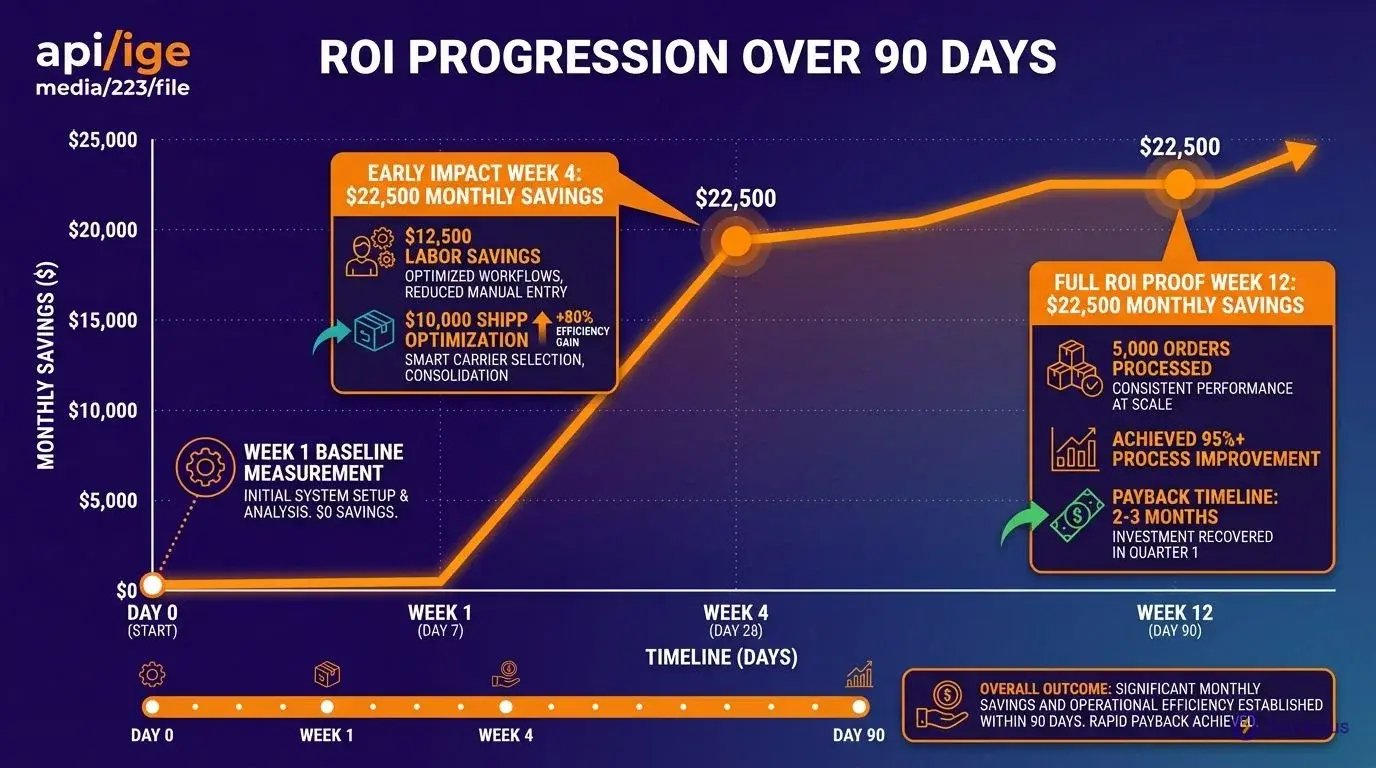
Your automated order routing saves money from day one. Here's the formula: (Manual processing cost - Automated cost) × Monthly orders = Monthly savings.
Real example: You process 5,000 orders monthly. Manual routing takes 10 minutes at $18/hour labor cost. That's $3.00 per order. Automated routing costs $0.50 per order. Savings: $2.50 × 5,000 = $12,500 monthly.
Add shipping optimization. Intelligent order routing cuts shipping costs by $2.00 per order through zone skipping and carrier selection. Another $10,000 monthly.
Total: $22,500 monthly savings on 5,000 orders.
These five metrics show whether automation is working:
1. Order cycle time - Order placement to shipment confirmation. Target: Under 4 hours for 90% of orders.
2. Perfect order rate - Complete, on-time, damage-free orders with accurate invoicing. Expect 94%+ after automation.
3. Shipping cost per order - Include all fees. Week 1 baseline divided by Week 12 actual shows improvement.
4. Inventory turnover - Better routing balances stock usage across locations. 10-15% improvement is typical.
5. Labor hours per 100 orders - Manual routing: 16.7 hours. Automated: 0.8 hours. That's 15.9 hours saved.
Week 1 captures your baseline. Week 4 shows early impact. Week 12 proves full ROI. Most operations see 300-500% first-year returns.
Quick Answers to Order Routing Questions
Q: How long does it take to implement automated order routing?
Four to six weeks. Week 1: audit current process. Week 2: map locations and carriers. Week 3: write routing rules. Weeks 4-5: connect systems. Week 6: test and launch. Clean inventory data cuts this to 4 weeks.
Q: What's the actual ROI of automated order routing?
$4.50 saved per order. That's $3.00 in labor plus $1.50 in shipping optimization. Process 1,000 orders daily? $135,000 monthly savings. Implementation costs $15,000-40,000. Payback: 2-3 months.
Q: Which systems need to integrate?
Four core connections: inventory management (stock levels), shopping cart (order details), carrier APIs (rates), and WMS (pick-pack status). Optional: ERP for financials, CRM for customer preferences.
Q: How accurate does inventory need to be?
85% minimum. Below that, you route to out-of-stock locations. Above 95% is overkill. Most operations run 90-92% successfully.
Q: What happens when automated routing fails?
Three fallback layers. First: secondary location rules. Second: manual review queue. Third: customer service override. Set alerts for failure rates above 5%.
Q: Can you automate routing without expensive software?
Yes, using spreadsheet macros. But it's painful and breaks at scale. Works for testing concepts with maybe 100 orders daily.
Q: How many routing rules should we start with?
Five maximum: inventory threshold (85%), shipping cost ceiling ($12), delivery requirements, carrier performance (95% on-time), and special handling flags. Add more after these work perfectly.
Ready to Transform Your Operations?
See how SkuNexus gives you full control over inventory, orders, warehouse, and shipping.
Schedule a Free Demo →
Keep Reading