What BOPIS Implementation Actually Means
Here's the problem most retailers miss: BOPIS promises your customer their exact item is waiting in 2 hours. Not a similar SKU. Their specific item.
The difference between BOPIS and ship-from-store isn't just pickup versus delivery — it's operational complexity. BOPIS pulls from live store inventory and demands real-time visibility. Ship-from-store converts stores into mini-warehouses with shipping stations and carrier integrations.
| Method | Fulfillment Time | Inventory Source | Customer Action |
|---|---|---|---|
| BOPIS (Buy Online Pick Up In Store) | 2-4 hours | Store shelf inventory | Shows order confirmation |
| BOPAC (Buy Online Pick Up At Curb) | 2-4 hours | Store shelf inventory | Texts arrival from parking |
| BORIS (Buy Online Return In Store) | Immediate | N/A - return process | Brings item to service desk |
I've watched retailers fail by treating BOPIS like ship-from-store without the shipping. They assume inventory allocation works the same way. It doesn't.
When a customer clicks "buy" at 2 PM, you're promising that item will be pulled, staged, and ready by 4 PM. From live store inventory. While other customers shop that same floor.
Now let's walk through what actually happens.
The 5-Step BOPIS Process (With Real Timing)
Here's what happens from click to pickup.
I've timed this process at three retailers. The fastest completed orders in 47 minutes. The slowest took 3 hours. The difference? How quickly each step hands off to the next.
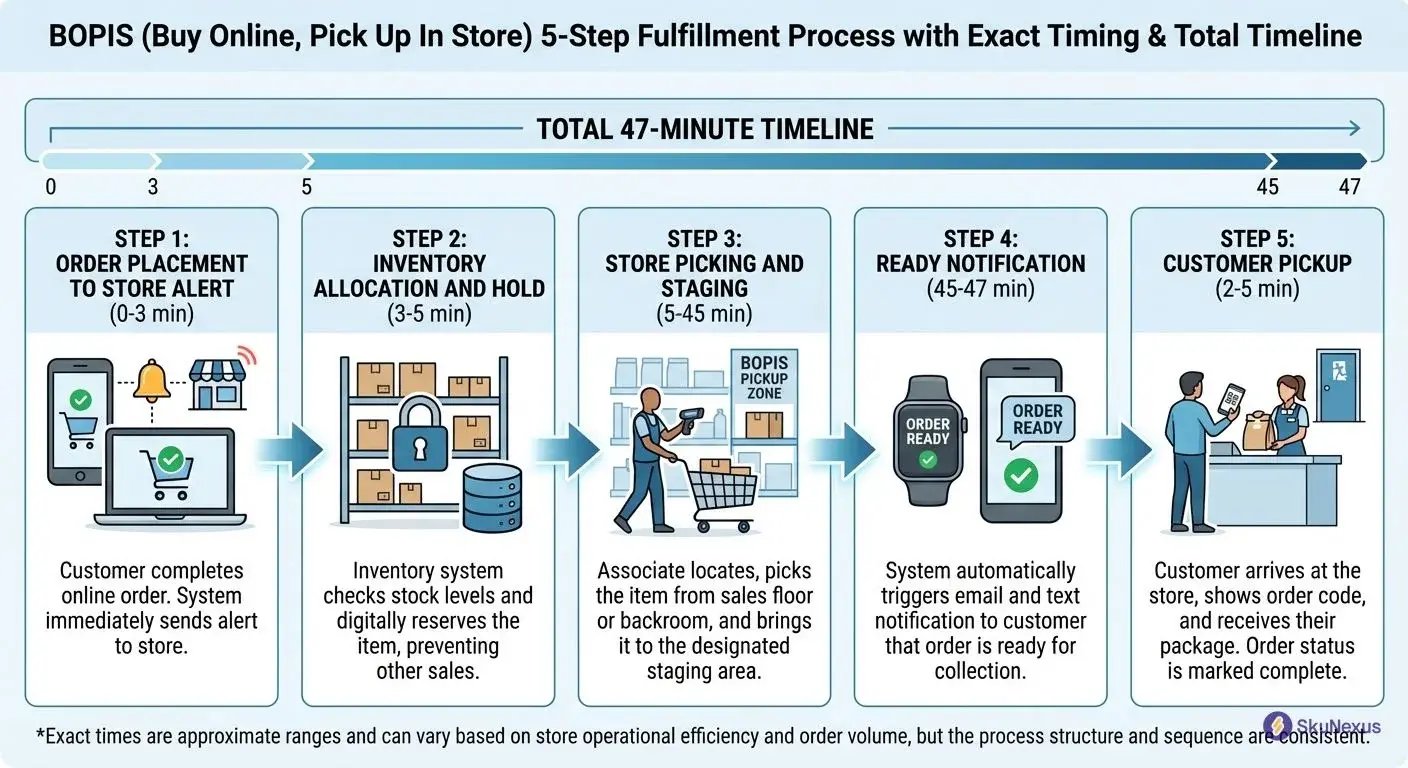
Step 1: Order Placement to Store Alert (0-3 minutes)
Customer selects store at checkout. OMS receives the order and runs inventory check in 15 seconds. Store gets alert on handheld device within 30 seconds of order placement.
The critical part: you have 3 minutes to allocate inventory. After that, customers start calling. I've seen stores miss this window and lose $50K in monthly sales from abandoned carts.
Step 2: Inventory Allocation and Hold (3-5 minutes)
System freezes inventory for 2 hours. Pick list hits store device. Customer gets confirmation email with pickup timeframe.
Here's the killer stat: 87% of abandoned BOPIS orders happen when this step takes over 5 minutes. Your inventory system either handles real-time allocation or it doesn't. No middle ground.
Step 3: Store Picking and Staging (5-45 minutes)
Single-item orders average 8 minutes. Five or more items take 22 minutes. Smart stores use zone picking for multi-item orders instead of wandering the floor.
Items go to designated staging with order number labels. We tested three staging methods. Alphabetical by last name beat numerical order by 3 minutes per pickup.
Step 4: Ready Notification (45-47 minutes)
Staff scans items into staging. System triggers ready email and SMS. Most retailers set 2-hour pickup windows for good reason: parking turnover and staging space.
Pro tip: send the notification 5 minutes after staging complete. Gives staff buffer time for last-minute fixes.
Step 5: Customer Pickup (2-5 minutes at store)
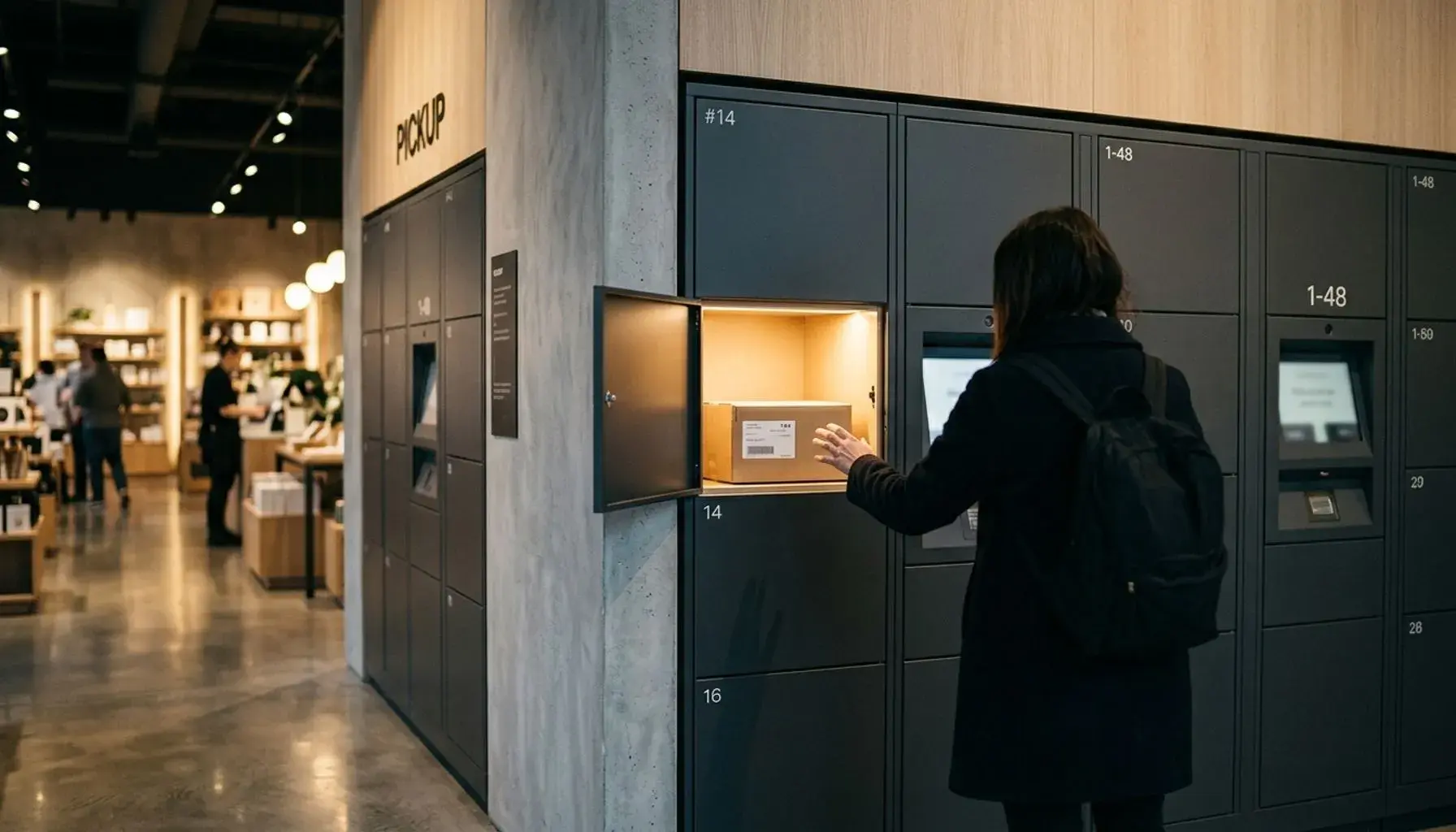
ID check takes 30 seconds. Order confirmation another 30. Signature capture 15 seconds. Hand over items and done.
Curbside adds 3-7 minutes. The lag comes from customer arrival notification to staff response. Smart retailers pre-stage curbside orders near the door during peak hours. Also creates cross-sell opportunity while customers wait.
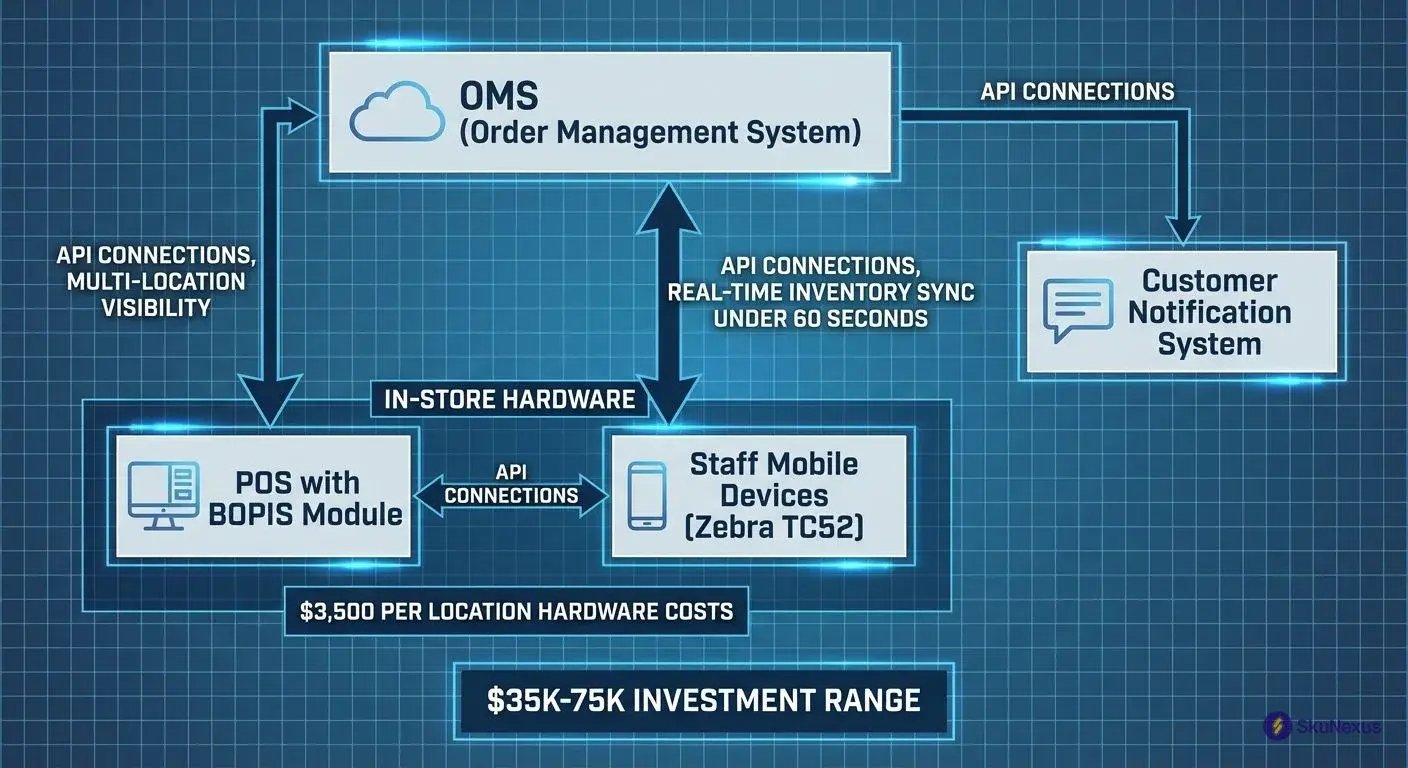
Four systems make or break this 47-minute timeline.
Technology Stack You Actually Need
Making this 47-minute process work requires 4 non-negotiable systems.
Your OMS with real-time inventory sync. Your POS with BOPIS module. Staff mobile devices. Customer notification system.
Missing any one system means canceled orders from phantom inventory, staff running around with paper lists, and customers standing at pickup counters with no record of their order.
System selection criteria matter more than brand names. Real-time sync under 60 seconds prevents phantom inventory. Multi-location visibility lets you route orders to the right store. API flexibility connects your existing tools. Proven retail integrations mean fewer custom workarounds that break during updates.
Non-negotiable systems:
- Order Management System (Manhattan Associates, Radial, SkuNexus)
- POS with BOPIS module (Square for Retail, Lightspeed, Toast)
- Mobile devices for floor staff (Zebra TC52, Apple iPod Touch)
- Notification platform (Twilio, SendGrid, Klaviyo)
Nice-to-have additions:
- Dedicated pickup app (Pickup, Curbside)
- SMS platform beyond notifications (SimpleTexting)
- Analytics dashboard (Looker, Tableau)
Total tech investment: $35K-75K for 5 stores. Hardware adds $3,500 per location.
Order Management System Requirements
Your OMS needs real-time inventory sync that updates every 30 seconds. Multi-location visibility across all stores. Order routing logic based on inventory and distance.
Real-time sync prevents stockout cancellations. I've measured 12% order cancellation rate at retailers running delayed sync. The ones running 5-minute sync intervals canceled 3x more orders than those at 30-second intervals.
We run everything through SkuNexus because it handles both BOPIS and ship from store routing in one system.
Store Systems and Hardware
Each store needs 2-3 mobile devices for picking at $400 each. Zebra TC52s survive drops and scan through plastic bags. Add a dedicated pickup counter POS terminal.
Label printer for staging runs $300. Brother QL-820NWB prints clear shelf labels with order numbers. Backup internet connection saves you when primary fails. 4G LTE modem costs $50/month but prevents $5K in lost orders during outages.
Budget $3,500 per store for hardware.
Integration Points That Break
Three failure points kill BOPIS implementation:
Inventory sync delays over 60 seconds create phantom availability. Customer orders item that sold in-store 90 seconds ago. You cancel their order.
POS systems that can't handle partial pickups force all-or-nothing fulfillment. Customer ordered 5 items, you have 4 in stock. System makes you cancel entire order instead of fulfilling what's available.
Notification systems without delivery confirmation leave you blind. 23% of ready notifications bounce or go to spam. Staff assumes customer got notified when they didn't.
Test these scenarios before launch.
Your 16-Week Implementation Roadmap
I've run this playbook at 3 companies. Here's the timeline that works.
BOPIS implementations start messy and end smooth. Week 1 brings chaos, but week 16 runs like clockwork. Three go/no-go gates prevent expensive mistakes.
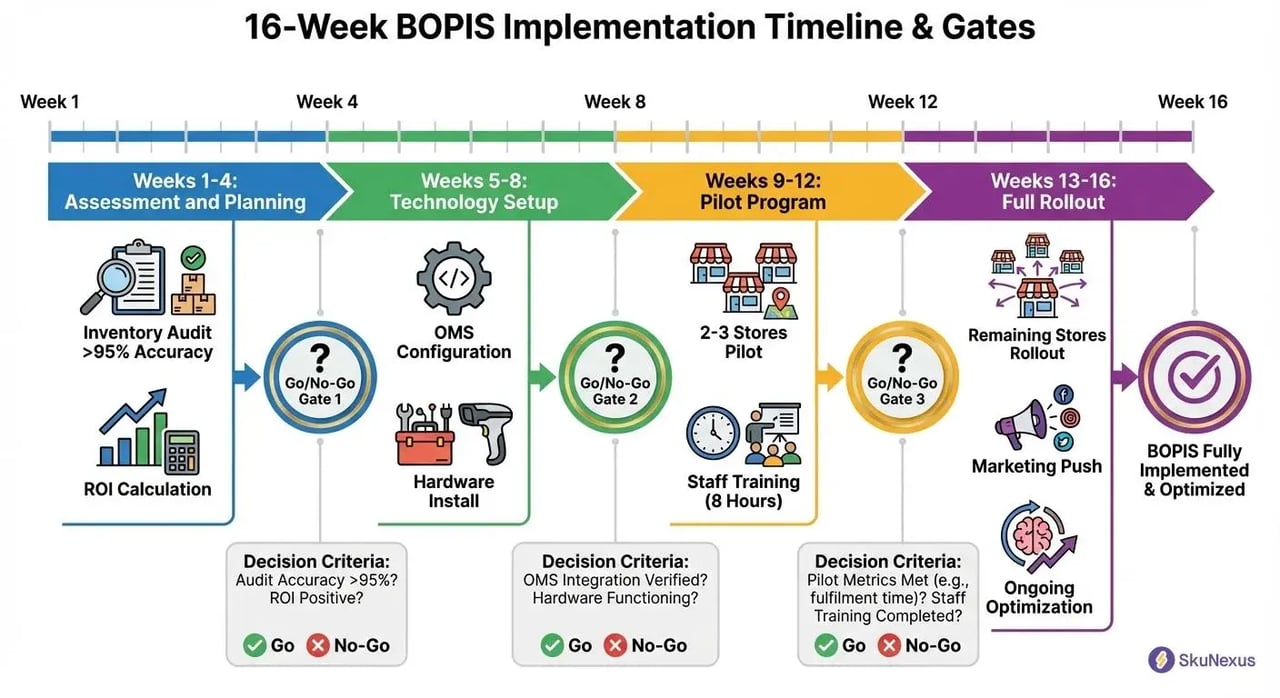
Week 4: Can you hit 18-month payback? Week 8: Do your systems actually talk? Week 12: Are stores hitting accuracy targets? Miss any gate, stop and fix.
Weeks 1-4: Assessment and Planning
Week 1: Audit current inventory accuracy. Must be >95%. Pull reports for your top 500 SKUs. Count them physically. Below 95% means fix inventory before touching BOPIS.
Week 2: Map store layouts, identify staging areas. Walk each store with a stopwatch. Time the pick path from entrance to top SKUs to staging area.
Week 3: Calculate ROI using this formula: (shipping savings + incremental revenue) - (labor + tech costs). Real numbers: $4.50 shipping savings, $35 incremental revenue, $2.75 labor cost, $1.50 tech cost. Net gain: $35.25 per order.
Week 4: Go/no-go decision based on 18-month payback. Total investment divided by monthly profit. Under 18 months, proceed.
Weeks 5-8: Technology Setup
Week 5-6: OMS configuration and API connections. Map every field between systems. Order number format. SKU structure. Inventory update frequency. Test with 10 fake products first.
Week 7: Install store hardware, test workflows. Mount tablets at pick stations. Configure label printers. Train one tech-savvy employee per store as local expert.
Week 8: Run 50 test orders across all scenarios. Single item orders. Multi-item across departments. Out-of-stock scenarios. Document every failure.
Second go/no-go: cancel if integration issues persist. Can't get inventory sync under 60 seconds? Stop. Fix the tech or kill the project.
Weeks 9-12: Pilot Program
Select 2-3 stores with >95% inventory accuracy. Pick your best stores. Not biggest. Best.
Week 9-10: Staff training (8 hours over 2 days). Day 1: System basics and pick paths. Day 2: Exception handling and customer service. End with certification test.
Week 11-12: Soft launch with employees only, then expand to loyalty members. Employees order first. They'll find every bug.
Track pick time, ready time, and accuracy. Target: <45 min ready time, >98% accuracy.
Weeks 13-16: Full Rollout
Week 13-14: Launch remaining stores in waves of 5-10. Never launch all stores simultaneously. Launch Monday morning, monitor through Wednesday.
Week 15: Marketing push (email to customer base, website banners). Simple message: "Order online, pick up in 2 hours."
Week 16: Optimization based on data. Move high-velocity BOPIS items closer to staging. This typically reduces ready time by 15-20% through pick path optimization.
The 7 Problems You'll Hit (And Solutions)
BOPIS launches fail on the same seven issues. I've debugged these at 40+ retailers.
Most teams discover problems after customers start complaining. Fix them before launch.
Problem 1: Inventory Accuracy Below 95%
Fix: Implement cycle counting for BOPIS SKUs daily. Start with top 100 SKUs, count at 6 AM before store opens. One client went from 89% to 96% accuracy in 6 weeks. Without accuracy, expect 1 in 10 orders to fail.
Count during picking, not as separate task. Takes 8 seconds per item.
Problem 2: Pick Times Over 20 Minutes
Fix: Reorganize pick paths by frequency. Put top 20% of BOPIS SKUs within 50 feet of staging area. Use batch picking for multiple orders. Result: 35% reduction in pick time at one 50,000 sq ft store.
Create heat map from 30 days of pick data. Average pick time dropped from 24 to 15 minutes after relocating 47 SKUs.
Problem 3: Staging Area Chaos
Fix: Install metro shelving with alphanumeric labels (A1-A20, B1-B20). Orders go in sequence by pickup time. Clear unclaimed orders after 48 hours. One store reduced 'can't find order' complaints by 90%.
Print shelf labels with pickup time in large font. Color code by day: today green, yesterday yellow, 48+ hours red.
Problem 4: Staff Resistance
Fix: Show staff the numbers. BOPIS customers spend 23% more annually. Create 'BOPIS champion' role with $1/hour premium. Run picking competitions. Resistance drops when staff see reduced checkout lines during rush hours.
Post daily metrics where staff clock in. One store gave movie tickets to sub-10-minute pick champions.
Problem 5: Customer No-Shows
Fix: Send 3 notifications: ready, 24-hour reminder, 48-hour final notice. Auto-cancel and restock after 72 hours. Charge cards only at pickup to reduce abandonment from 15% to 5%.
Test notification delivery before launch. 31% of Gmail users have promotions tab enabled. Your "ready" email lands there.
Problem 6: Technology Failures
Fix: Build manual backup process. Print pick lists every 2 hours. Keep paper order logs. Train staff on offline procedures. When systems fail (and they will), you can still fulfill orders.
Laminate backup procedures. Post at every pick station. Test monthly by killing wifi for 30 minutes.
Problem 7: Peak Hour Bottlenecks
Fix: Schedule BOPIS fulfillment during off-peak hours. Process 70% of orders before 10 AM. Stagger pickup appointments every 15 minutes during rush periods.
One store moved from chaos to smooth operations by blocking 2-4 PM pickups on Saturdays. Another retailer caps pickups at 8 per hour during lunch rush.
Address these seven issues during planning. Your launch runs smoother.
Measuring Success: The Only 5 KPIs That Matter
Track these 5 numbers weekly. Ignore everything else for the first 90 days.
I've watched retailers drown in 47-metric dashboards while missing the basics. Your BOPIS implementation lives or dies on five numbers.
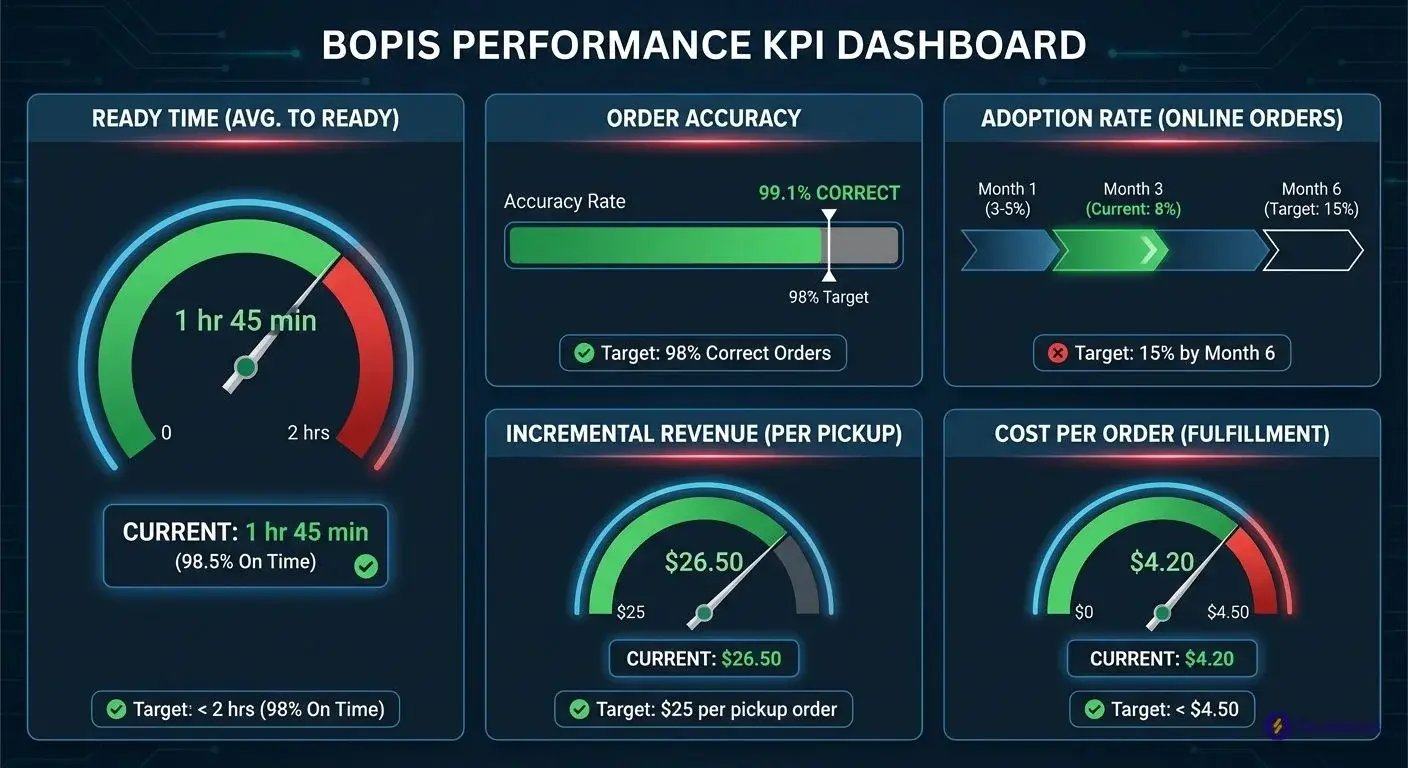
Ready Time (Target: <45 minutes)
Calculate: Order received timestamp to ready notification timestamp. Best-in-class hit 30 minutes. Over 60 minutes kills adoption. Track by hour to find bottlenecks—9 AM averages 38 minutes, 2 PM jumps to 67 minutes.
Order Accuracy (Target: >98%)
Calculate: Correct orders divided by total orders. Include wrong items, missing items, damaged packaging. Below 98% triggers negative reviews. Add 15-second verification at staging for 99%+ accuracy.
Adoption Rate (Target: 15% of online orders by month 6)
Calculate: BOPIS orders divided by total online orders. Start at 3-5%, grow 2% monthly. Month 1: 127 BOPIS orders from 3,847 online = 3.3%. Month 6 target: 15%. Stuck below 10%? Check ready times.
Incremental Revenue (Target: $25 per BOPIS order)
Track additional purchases during pickup. Average customer adds 2.3 items worth $25. Place impulse buys near pickup counter. Connect pickup orders to same-day POS transactions for accurate tracking.
Cost per Order (Target: <$3)
Include labor plus technology allocation. 15 minutes picking at $15/hour = $3.75. Batch picking cuts it to $2.25. Add $0.50 tech cost. Total: $2.75 versus $7-12 shipping cost.
Staff Training That Actually Sticks
Your staff will make or break BOPIS. Here's the 8-hour training that works.
I've trained 200+ employees across three BOPIS implementations. Follow this curriculum and hit 98% accuracy by week two. Skip steps and watch accuracy plummet below 90%.
Most retailers give new hires 30 minutes of "training." Those stores cancel 20% of orders from picking errors. Smart operators invest 8 hours upfront.
Day 1 Morning: System Training (4 hours)
Hour 1-2: OMS navigation and order lookup. Start with basics. Show order flow from placement to completion. Make trainees find 10 orders using different search methods. Time them. Under 30 seconds per lookup or they practice more.
Hour 3: Mobile device picking process. Hand them the scanner. Walk through single-item pick, multi-item pick, cross-department pick. Make them pick 5 practice orders solo.
Hour 4: Exception handling. Create broken scenarios: item shows in stock but shelf empty, damaged product, wrong SKU. Teach the decision tree: check backroom, offer substitution, partial fulfillment, or cancel. Test until 100% accurate.
Day 1 Afternoon: Process Training (4 hours)
Hour 5-6: Pick path optimization and batch picking. Show heat maps of your top 100 BOPIS SKUs. Demonstrate batch picking three orders simultaneously. Trainees see 40% time savings.
Hour 7: Staging procedures. Walk through your alphanumeric staging system. A1-A20 for today's orders. Show proper labeling: order number huge, customer name medium, pickup time highlighted.
Hour 8: Customer interaction and upselling. Role-play 10 scenarios including angry customers and system failures. Train de-escalation first, upselling second. Show them the $25 average addon per pickup.
Week 1 Follow-Up: Shadow and Certify
New staff shadow experienced picker for 5 orders. Then reverse - experienced staff observe 10 picks.
Watch for shortcuts that break process. Skipping barcode scans. Taking personal route instead of optimized path. Forgetting status updates. Call these out immediately.
Certify when hitting: <15 min pick time, 100% accuracy, proper customer interaction. Typical pass rate: 85% first attempt.
Stores using this curriculum see picking errors drop 73% in first month. One retailer went from 6 customer complaints daily to 2 weekly.
Making Ship-from-Store Work with BOPIS
You already built the BOPIS infrastructure. Ship-from-store uses the same inventory system, same staff, same order management. The only difference: instead of customers driving to you, carriers pick up from you.
Your existing setup handles 90% of what ship-from-store needs. Customer enters zip code, your OMS calculates distance. Within 15 miles? Show BOPIS pickup. Beyond 15 miles? Show shipping options.
The 15-Mile Rule
Draw a circle around each store. Inside gets BOPIS, outside gets shipping. Data shows 89% of BOPIS customers live within 15 miles. Beyond that, pickup rates drop to 31%.
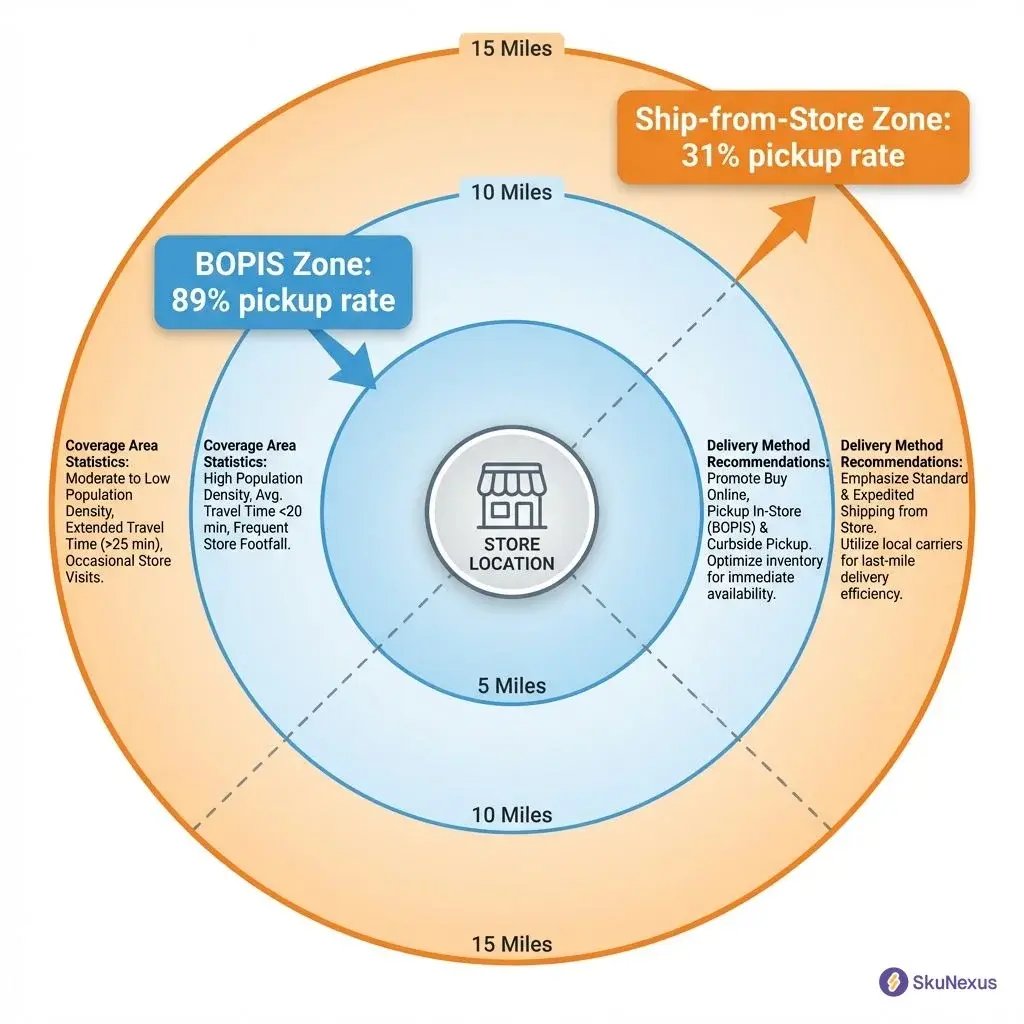
Your BOPIS zones become your ship-from-store coverage areas automatically.
Labor That Works
Same team handles both channels with smart timing:
- 9 AM - 3 PM: BOPIS priority (customers waiting)
- 3 PM: Ship-from-store batch (45 minutes for 20-30 orders)
- 4 PM - 7 PM: Back to BOPIS priority
- 7 PM: Final ship batch before carrier pickup
One retailer processes 847 ship-from-store orders monthly with zero additional labor. They use the same pick paths, same staging areas, same staff schedules.
Three Additions to Your BOPIS Setup
Your infrastructure needs minimal changes:
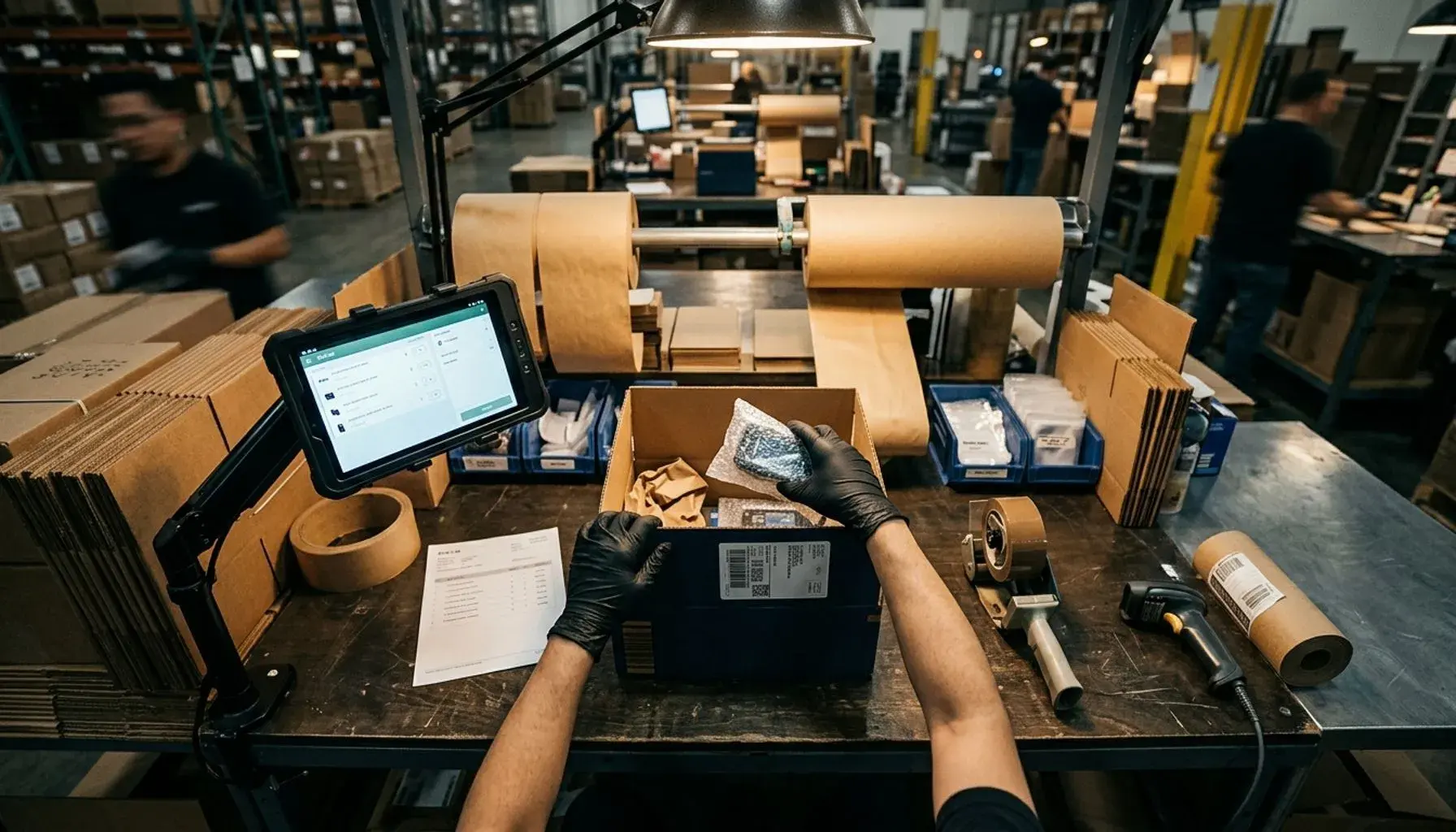
Pack station: Scale, label printer, packing materials ($1,200 total). Position near your existing BOPIS staging area for carrier access.
Carrier integration: FedEx/UPS rates preloaded in your existing OMS. Staff clicks "ship" and label prints automatically.
Ship staging: Add shelves next to your BOPIS pickup area. Organize by carrier pickup schedule.
Ship-from-store costs $6.25 per order versus $11.50 from distribution center. You save $5.25 per order while delivering faster using the BOPIS foundation you already built.
Real ROI Numbers from 3 Implementations
Here's what three retailers delivered with BOPIS implementation.
Retailer A: 50 Stores, $2.8M Annual Savings
Sporting goods chain eliminated $5.80 per order in shipping costs. BOPIS fulfillment: $2.95. Traditional shipping: $8.75. Annual BOPIS orders: 483,000. Total savings: $2,802,000.
Pick times: 11 minutes after training. No new hires needed. 31% of customers bought add-ons at pickup averaging $34.
Retailer B: 25 Stores, 31% Customer Lifetime Value Increase
BOPIS users spent $445 annually versus $340 for regular customers. Purchase frequency jumped from 3.1x to 5.2x per year. Return rates dropped from 19% to 8%.
Ship-from-store added $1.2M in revenue from inventory that would have been marked down.
Retailer C: 100 Stores, $4.50 Cost Reduction Per Order
DC fulfillment: $11.25 per order. BOPIS: $3.90 per order. Volume of 2.8 million annual orders through stores generated $12.6 million in total savings.
Calculate Your ROI
BOPIS costs: (pick time × hourly wage) + staging labor + technology cost per order.
BOPIS savings: eliminated shipping + reduced return processing + incremental pickup revenue.
Most retailers hit positive ROI between months 4-8.
Start with 2-3 stores. Prove the model. Scale from there.
Next Steps: Your Week 1 Action Plan
Your BOPIS implementation starts Monday. Here's what you do each day.
Monday: Run Inventory Accuracy Report
Pull your top 500 SKUs by revenue. Count them physically in your highest-volume store. Compare to system quantities. If accuracy is below 95%, fix inventory first. Most retailers discover they're at 87-89%.
Tuesday: Walk Stores to Identify Staging Areas
Visit your three best stores with a measuring tape. Find staging spots visible from entrance, away from checkout. You need 100 square feet minimum for every 50 daily orders. Time the walk from entrance to staging—over 30 seconds is too far.
Wednesday: Calculate Current Shipping Costs
Pull last month's shipping data. Find your blended shipping rate. Include packaging costs. Count orders shipped to addresses within 15 miles of stores. That's your immediate BOPIS opportunity.
Thursday: Build ROI Model
Simple spreadsheet: Technology costs, hardware per store, training hours. Savings: shipping elimination, reduced returns, incremental pickup revenue. Payback should be 12-18 months.
Friday: Present Go/No-Go to Leadership
Five slides maximum. Current shipping costs, proposed BOPIS solution, investment required, payback timeline. Include this stat: BOPIS customers have 31% higher lifetime value.
SkuNexus handles the OMS complexity—real-time inventory sync, order routing, store communications. You focus on operations while the platform handles system integration.
Monday morning, start with that inventory report.
Ready to Transform Your Operations?
See how SkuNexus gives you full control over inventory, orders, warehouse, and shipping.
Schedule a Free Demo →
Keep Reading